子弹扩散好像有问题
EqZero.Weapon.DrawBulletTraceDuration 5.0 — 画出子弹飞行轨迹(红线),持续 5 秒
EqZero.Weapon.DrawBulletHitDuration 5.0 — 画出命中点(红点),持续 5 秒
EqZero.Weapon.DrawBulletHitRadius 10.0 — 调整命中点的显示半径(默认 3.0 uu,可以调大方便观察)
子弹太分散了,散射逻辑好像有问题
#if WITH_EDITOR
void UEqZeroRangedWeaponInstance::PostEditChangeProperty(struct FPropertyChangedEvent& PropertyChangedEvent)
{
    Super::PostEditChangeProperty(PropertyChangedEvent);
    UpdateDebugVisualization();
}

void UEqZeroRangedWeaponInstance::UpdateDebugVisualization()
{
    ComputeHeatRange(Debug_MinHeat, Debug_MaxHeat);
    ComputeSpreadRange(Debug_MinSpreadAngle, Debug_MaxSpreadAngle);
    Debug_CurrentHeat = CurrentHeat;
    Debug_CurrentSpreadAngle = CurrentSpreadAngle;
    Debug_CurrentSpreadAngleMultiplier = CurrentSpreadAngleMultiplier;
}
#endif
这个DEBUG 不知道怎么开,还是打LOG把
发现UEqZeroRangedWeaponInstance的tick没跑,热度没下降
bool UEqZeroRangedWeaponInstance::UpdateSpread(float DeltaSeconds)
{
    const float TimeSinceFired = GetWorld()->TimeSince(LastFireTime);

    // 开火后,超过这个时间,热度下降
    if (TimeSinceFired > SpreadRecoveryCooldownDelay)
    {
        // 根据当前热量决定冷却速度(例如:热量越高,冷却越快)。
        // 但是 HeatToCoolDownPerSecondCurve 曲线目前只有一个 (0, 10)的点
        const float CooldownRate = HeatToCoolDownPerSecondCurve.GetRichCurveConst()->Eval(CurrentHeat);

        // 减少热量,然后修改当前扩散角度
        CurrentHeat = ClampHeat(CurrentHeat - (CooldownRate * DeltaSeconds));
        CurrentSpreadAngle = HeatToSpreadCurve.GetRichCurveConst()->Eval(CurrentHeat);
    }

    float MinSpread;
    float MaxSpread;
    ComputeSpreadRange(MinSpread, MaxSpread);

    // 是否已经恢复到了最小扩散状态(用于判断首发精准度), 最小扩散点是曲线的中点,上面几行
    return FMath::IsNearlyEqual(CurrentSpreadAngle, MinSpread, KINDA_SMALL_NUMBER);
}
发现tick是这里过来的
void UEqZeroWeaponStateComponent::TickComponent(float DeltaTime, enum ELevelTick TickType, FActorComponentTickFunction* ThisTickFunction)
{
    Super::TickComponent(DeltaTime, TickType, ThisTickFunction);

    /*
     * 调用角色身上所有远程武器实例的 Tick 方法,确保它们能持续更新状态(例如热量、扩散等),以便在 UI 上做出相应反馈。
     */
    if (APawn* Pawn = GetPawn<APawn>())
    {
        if (UEqZeroEquipmentManagerComponent* EquipmentManager = Pawn->FindComponentByClass<UEqZeroEquipmentManagerComponent>())
        {
            if (UEqZeroRangedWeaponInstance* CurrentWeapon = Cast<UEqZeroRangedWeaponInstance>(EquipmentManager->GetFirstInstanceOfType(UEqZeroRangedWeaponInstance::StaticClass())))
            {
                CurrentWeapon->Tick(DeltaTime);
            }
        }
    }
}
UEqZeroWeaponStateComponent 这个通过 GameFeature 配置在 Controller的
组件压根没配呀
准星开火的时候效果相当不对
BUG1:
调试发现 CurrentSpreadAngle 在开火后的数值过小
问题是 HeatToSpreadCurve 配置错误,这个点必须按下回车数值才能确认修改,点空白处数值就回去了,没改上
BUG2:
对于原项目的蓝图,Reticle Widget Base
Set Radius 影响十字的扩散(这个taget是控件)后面的 Set Width/Height Override 影响那个开枪后正方形的框的缩放
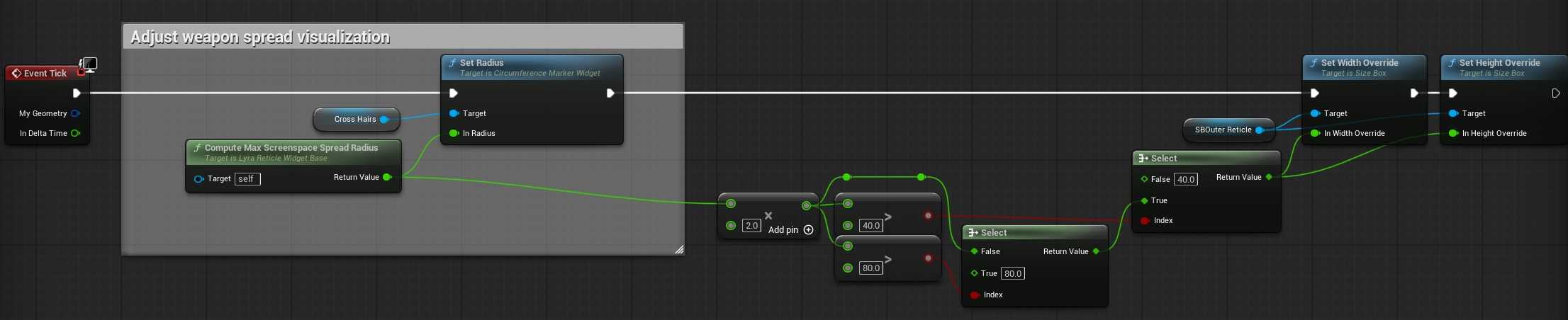
这部分调试清楚
BUG3:
红叉的命中动画,这是一个普通的图片 EliminationMarker
但是这个控件是隐藏的,动画也还没播放。
发现是 SEqZeroHitMarkerConfirmationWidget 这个的问题,每次射击他一定把所有东西都画出来。
队伍系统没有
bool UEqZeroWeaponStateComponent::ShouldShowHitAsSuccess(const FHitResult& Hit) const
{
    AActor* HitActor = Hit.GetActor();

    // 暂时没有队伍系统,默认所有人都是敌人

    return true;
}
但是为了射线检测 UEqZeroGameplayAbility_RangedWeapon::TraceBulletsInCartridge 的最后,有默认有一个命中,所以达到啥都有效果。
// 确保 OutHits 中始终有一个条目,这样方向就可以用于追踪器等。
if (OutHits.Num() == 0)
{
    if (!Impact.bBlockingHit)
    {
        // 在轨迹末尾找到伪造的 “影响”
        Impact.Location = EndTrace;
        Impact.ImpactPoint = EndTrace;
    }

    OutHits.Add(Impact);
}
所以这个地方先改成这样
bool UEqZeroWeaponStateComponent::ShouldShowHitAsSuccess(const FHitResult& Hit) const
{
    AActor* HitActor = Hit.GetActor();
    if (HitActor == nullptr)
    {
        return false;
    }

    // 只有打到 Pawn(角色)才算成功命中
    // 后续接入队伍系统后可进一步判断敌我
    return HitActor->IsA<APawn>();
}
爆头伤害生效了吗
Gameplay.Zone.WeakSpot 查查引用
default engine ini 补上,主要是这几个 SurfaceType
[/Script/Engine.PhysicsSettings]
+PhysicalSurfaces=(Type=SurfaceType1,Name="Character")
+PhysicalSurfaces=(Type=SurfaceType2,Name="Concrete")
+PhysicalSurfaces=(Type=SurfaceType3,Name="Glass")
创建 PhysicalMaterialWithTags
/Game/Characters/PhysMat_Player.PhysMat_Player
/Game/Characters/PhysMat_Player_WeakSpot.PhysMat_Player_WeakSpot 这个配置了弱点TAG
对这个
/Game/Characters/Heroes/Mannequin/Rig/PA_Mannequin.PA_Mannequin
骨骼树的
Simple Collision Physical Material
Phys Material Override
这两个关联好创建的 PhysicalMaterialWithTags
OK 伤害明显生效了
发现没有受击动画呀
估计藏在某个Cue里面
GameplayCue.Character.DamageTaken
这是直接在伤害GE里面配置的 Cue的 TAG
好像只是音效和跳字
===
傻了,应该直接搜索受击蒙太奇的引用的
找到开火技能有一个 "Slelect Hit Montage" 没有引用。。。
===
删除 GameplayCue.Character.DamageTaken 这个TAG会影响受击,
所以还是这个Cue的问题
在 Event On Burst 。。。
相关资产
/EqZeroCore/Weapons/GE_Damage_Melee.GE_Damage_Melee
/Game/GameplayEffects/Damage/GameplayEffectParent_Damage_Basic.GameplayEffectParent_Damage_Basic
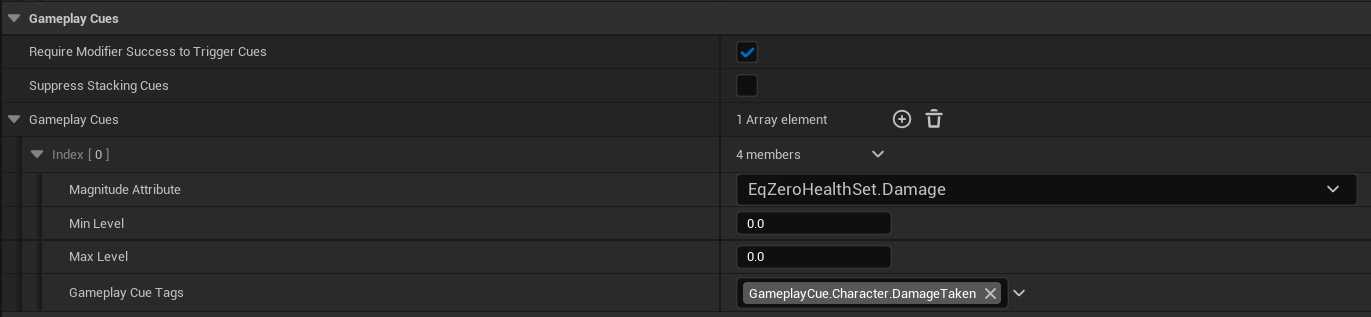
在Cue中
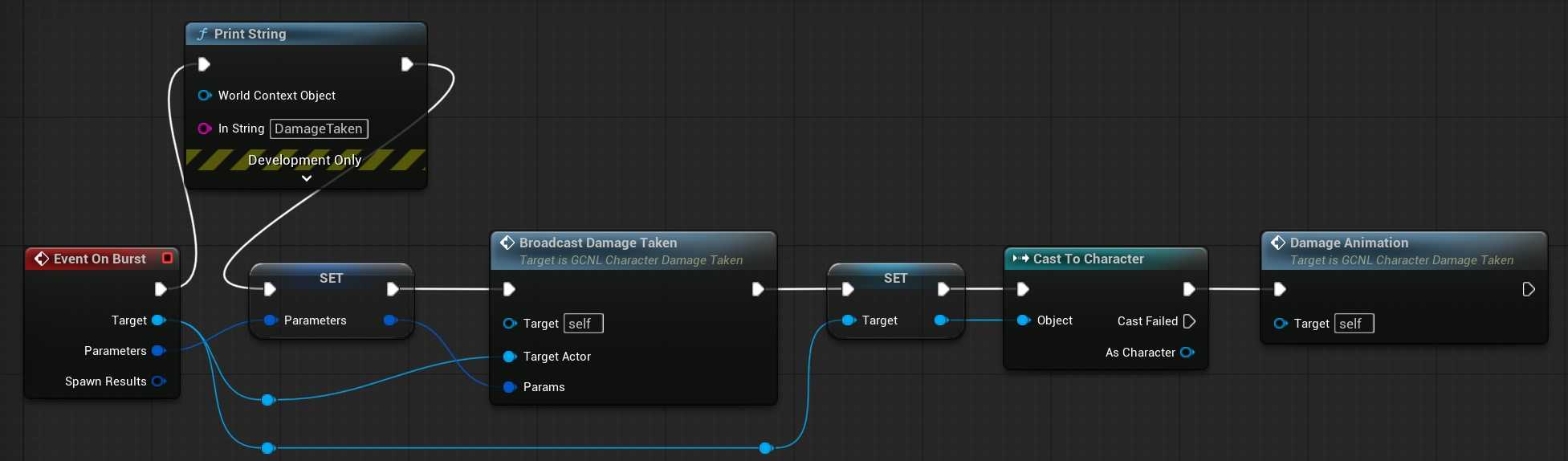
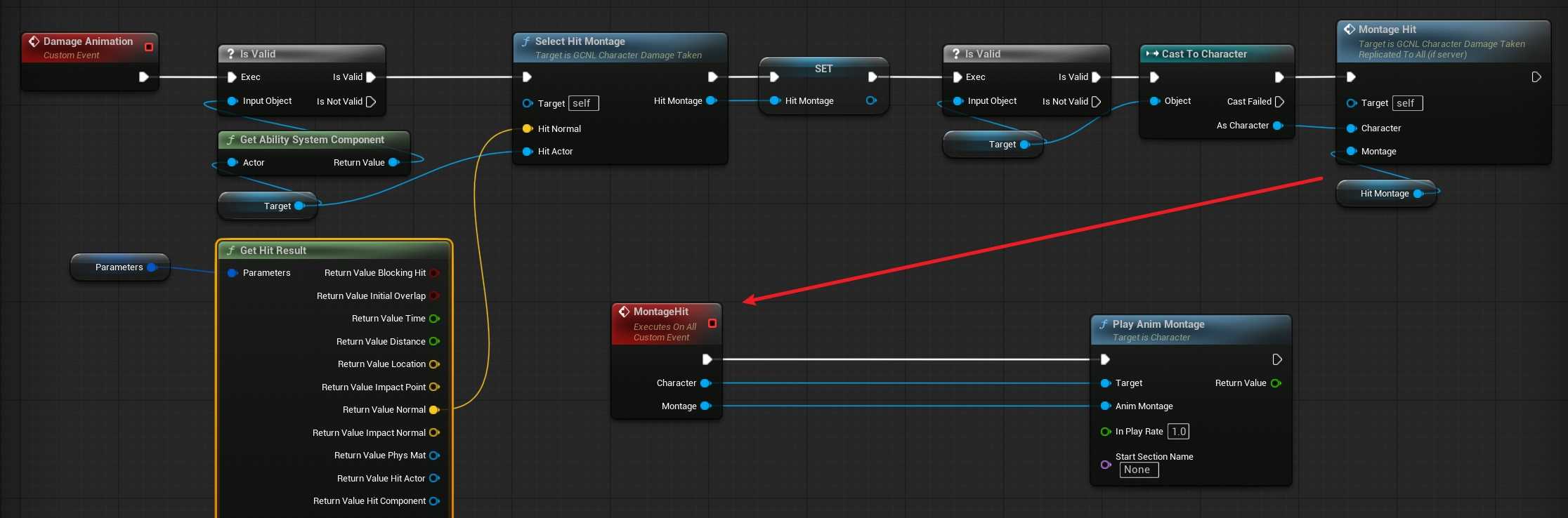
这样有一个BUG,
开火的蒙太奇,自己看不到 X,对面看得到
近战的受击,双端都能看得到。
GE都是权威发起的,配置也都对过了?
咋整?
emmmmmmmm
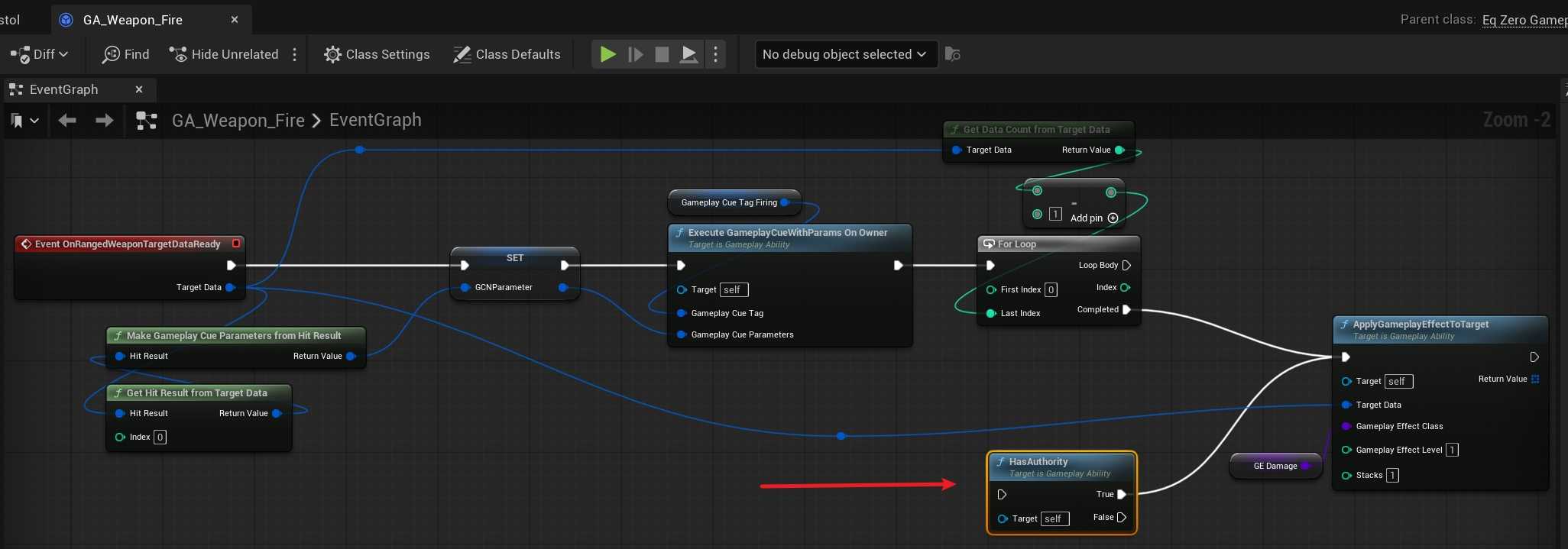
AI说要把这个权威干掉
问题原因
- 客户端调用 StartRangedWeaponTargeting(),创建了带 客户端预测 Key 的 FScopedPredictionWindow
CallServerSetReplicatedTargetData把预测 Key 发给服务器- 服务器在
ServerSetReplicatedTargetData回调中,恢复了这个 客户端的预测 Key 到 ASC 的 ScopedPredictionKey - 蓝图中 HasAuthority → True → 只有服务器调用 ApplyGameplayEffectToTarget
- 服务器执行 GE → 触发 Cue →
NetMulticast携带了 客户端预测 Key - 在 owning client(开枪的那个客户端)上:
- PredictionKey.IsLocalClientKey() = true(这是它自己生成的 Key)
- 条件变成 false || false = false → Cue 被抑制!
- 引擎认为:"这个 Key 是你自己客户端生成的,你应该已经在本地预测执行过了"
- 但因为蓝图里有 HasAuthority 检查,客户端从未本地预测执行过这个 GE/Cue
- 结果:开枪的客户端看不到 Cue,另一个客户端看得到
虽然这个修改可以,但是和Lyra的写法不一致,而且Lyra是没问题的
客户端拿到了一个Key发给服务器,自己也继续走
服务器执行 GE,触发 Cue
void FActiveGameplayEffectsContainer::ExecuteActiveEffectsFrom(FGameplayEffectSpec &Spec, FPredictionKey PredictionKey)
{
    //

    if (InvokeGameplayCueExecute && SpecToUse.Def->GameplayCues.Num())
    {
        // TODO: check replication policy. Right now we will replicate every execute via a multicast RPC

        UE_LOG(LogGameplayEffects, Log, TEXT("Invoking Execute GameplayCue for %s"), *SpecToUse.ToSimpleString());

        UAbilitySystemGlobals::Get().GetGameplayCueManager()->InvokeGameplayCueExecuted_FromSpec(Owner, SpecToUse, PredictionKey);
    }
}
服务器发 NetMulticast,携带客户端的预测 Key
if (bHasAuthority)  // 服务器 = true
{
    RepInterface->Call_InvokeGameplayCueExecuted_FromSpec(
        PendingCue.FromSpec,
        PendingCue.PredictionKey);  // ← 客户端的预测 Key 被塞进 Multicast RPC
}
Call_InvokeGameplayCueExecuted_FromSpec 是一个 UFUNCTION(NetMulticast),发给所有端。
(核心):owning client 收到 Multicast,判断是否执行
void UAbilitySystemComponent::NetMulticast_InvokeGameplayCueExecuted_FromSpec_Implementation(
    const FGameplayEffectSpecForRPC Spec, FPredictionKey PredictionKey)
{
    if (IsOwnerActorAuthoritative() || PredictionKey.IsLocalClientKey() == false)
    //  ^^^^^^^^^^^^^^^^^^^^^^^^^^^^^^   ^^^^^^^^^^^^^^^^^^^^^^^^^^^^^^^^^^^^^^
    //  客户端上 = false                  关键判断!
    {
        InvokeGameplayCueEvent(Spec, EGameplayCueEvent::Executed);
    }
}
对于开枪的客户端(owning client):
PredictionKey.IsLocalClientKey() 是 true。不满足第二个条件,所以Cue被跳过了
为什么?
bool IsLocalClientKey() const
{
    return Current > 0 && !bIsServerInitiated;
}
GameplayPrediction.cpp:127(NetSerialize):
// 服务器发出时:
ValidKeyForConnection = (Current > 0) &&
    (bIsServerInitiated ||
     PredictiveConnectionObjectKey == FObjectKey() ||
     PredictiveConnectionObjectKey == FObjectKey(Map));
//   ↑ 这个 Key 的 PredictiveConnectionObjectKey 就是开枪客户端的连接
//   ↑ 对于开枪客户端的连接:Map 匹配 → ValidKeyForConnection = true → 序列化 Current 值
//   ↑ 对于其他客户端的连接:Map 不匹配 → ValidKeyForConnection = false → Current 为 0
所以:
- 开枪客户端收到 Multicast 时:Current > 0,bIsServerInitiated = false → IsLocalClientKey() = true → Cue 被跳过
- 其他客户端收到 Multicast 时:Current = 0(Key 无效,不是它生成的)→ IsLocalClientKey() = false → Cue 正常执行
设计意图:
"如果这个 Multicast 携带的 PredictionKey 是我本地生成的,说明我之前应该已经在 PredictivelyExecuteEffectSpec 中本地预测执行过这个 Cue 了,收到服务器的确认时应该跳过,避免重复播放。"
但因为你蓝图加了 HasAuthority,客户端从未执行过 ApplyGameplayEffectToTarget,自然也从未预测执行过 Cue。服务器的确认到了,客户端还是跳过了 → 结果就是开枪的人自己看不到受击效果。
【所以lyra还有其他流程能播放受击蒙太奇动画???】
===
但是Melee为什么没有被抑制???
Melee(C++ 直接调用)
// EqZeroGameplayAbility_Melee.cpp
SourceASC->ApplyGameplayEffectSpecToTarget(*SpecHandle.Data.Get(), TargetASC);
//                                         没有第三个参数 ↑
ApplyGameplayEffectSpecToTarget 的签名:
virtual FActiveGameplayEffectHandle ApplyGameplayEffectSpecToTarget(
    const FGameplayEffectSpec& GameplayEffect,
    UAbilitySystemComponent* Target,
    FPredictionKey PredictionKey = FPredictionKey());  // ← 默认空 Key
Melee 没传 PredictionKey → 默认空 Key → Cue Multicast 携带空 Key → IsLocalClientKey() = false (Current=0) → 所有客户端都执行 Cue ✓
Ranged(蓝图 ApplyGameplayEffect 节点)
蓝图节点 K2_ApplyGameplayEffectSpecToTarget 内部调用:
Data->ApplyGameplayEffectSpec(
    *SpecHandle.Data.Get(),
    ActorInfo->AbilitySystemComponent->GetPredictionKeyForNewAction());
//                                     ^^^^^^^^^^^^^^^^^^^^^^^^^^^^
//                                     返回当前 FScopedPredictionWindow 的 PredictionKey
蓝图节点自动传了客户端的 PredictionKey → Cue Multicast 携带该 Key → Owning Client 上 IsLocalClientKey() = true → Cue 被抑制 ✗
这下合理了。
===
/Game/Effects/Camera/Damage/NCLE_DamageTaken.NCLE_DamageTaken
这个是角色屏幕上的类似受击UI的一个特效
FEqZeroVerbMessage 相关流程
AI:GAS双端的职责划分
属性修改 → 服务器权威;表现反馈 → 双端都跑(预测系统自动去重)。
| 操作 | 该在哪里执行 | 原因 |
|---|---|---|
| ActivateAbility | 双端 | 客户端预测激活,服务器权威确认 |
| CommitAbility(消耗/CD) | 双端 | 客户端预测扣费,服务器确认 |
| ApplyGameplayEffectToSelf(对自己) | 双端 | 客户端预测属性变化,服务器同步修正 |
| ApplyGameplayEffectToTarget(对别人) | 看情况 ⚠️ | 见下文详解 |
| GameplayCue(表现/特效) | 双端 | 引擎通过 PredictionKey 自动去重 |
| Montage / 动画 | 双端 | 客户端即时播放,服务器复制给其他人 |
| 射线检测 / 瞄准 | 客户端 | 本地精度最高,结果通过 TargetData 发给服务器 |
| 伤害结算 | 服务器 | 属性是服务器权威的 |
模式 A:无预测(Lyra 的做法)
客户端: 射线检测 → TargetData → 发给服务器
服务器: HasAuthority ✓ → ApplyGE → 属性修改(复制回客户端)
受击反馈: 通过属性变化回调/消息系统触发(不用 GE 上的 Cue)
模式 B:有预测(GE 上配了 Cue)
客户端: 射线检测 → TargetData → 同时:
    ├─ 本地 ApplyGE(预测执行 → Cue 立即播放)

    └─ 发 TargetData 给服务器
服务器: ApplyGE(权威执行 → Multicast Cue → 其他客户端播放)
开枪客户端收到 Multicast → 识别到预测 Key → 跳过(不重复)适用场景:GE 上配了 GameplayCue,需要开枪者即时看到受击效果
你的项目就是模式 B,但蓝图加了 HasAuthority 阻止了客户端本地预测 → 破坏了链路。
PS【这里其实是我项目的BUG,可能还要查一查,Lyra用的也是B方案】
预测系统的核心逻辑(三句话版)
- 客户端先做,服务器后确认 — 客户端在 ScopedPredictionWindow 内执行的操作会产生一个预测 Key
- 服务器做同样的事 — 服务器执行后通过 Multicast 广播结果,携带同一个预测 Key
- 客户端自动去重 — 收到 Multicast 后,如果 Key 是自己生成的(
IsLocalClientKey() == true),跳过(因为已经本地预测过了)
当前项目的两种伤害方式
近战
void UEqZeroGameplayAbility_Melee::ActivateAbility(const FGameplayAbilitySpecHandle Handle, const FGameplayAbilityActorInfo* ActorInfo, const FGameplayAbilityActivationInfo ActivationInfo, const FGameplayEventData* TriggerEventData)
{
    Super::ActivateAbility(Handle, ActorInfo, ActivationInfo, TriggerEventData);

    CommitAbility(Handle, ActorInfo, ActivationInfo);

    PlayMeleeMontage();

    if (HasAuthority(&ActivationInfo))
    {
        MeleeCapsuleTrace();
    }
}
LocalPredict 动作客户端先跑了,然后在服务器做射线检测,触发GE,然后GE里面有伤害和Cue
Client: ActivateAbility → CommitAbility(预测消耗) → PlayMeleeMontage(播动画)
Server: ActivateAbility → CommitAbility(确认消耗) → PlayMeleeMontage → MeleeCapsuleTrace → ApplyGE
射击
Local Control 触发 StartRangedWeaponTargeting 客户端射线检测
然后两条路
- CallServerSetReplicatedTargetData 带着TargetData去服务器了
- 继续向下走
都会跑的流程
CommitAbility
OnRangedWeaponTargetDataReady 这里是蓝图的逻辑
模拟端直接去走 Cue 的逻辑了
    if (bTreatAsInfiniteDuration)
    {
        // This is an instant application but we are treating it as an infinite duration for prediction. We should still predict the execute GameplayCUE.
        // (in non predictive case, this will happen inside ::ExecuteGameplayEffect)

        if (!bSuppressGameplayCues)
        {
            UAbilitySystemGlobals::Get().GetGameplayCueManager()->InvokeGameplayCueExecuted_FromSpec(this, *OurCopyOfSpec, PredictionKey);
        }
    }
这里
    else if (Spec.Def->DurationPolicy == EGameplayEffectDurationType::Instant)
    {
        // This is a non-predicted instant effect (it never gets added to ActiveGameplayEffects)
        ExecuteGameplayEffect(*OurCopyOfSpec, PredictionKey);
    }
这里会去 GE的伤害 求值器
总结:
Client: ActivateAbility → 蓝图调用 StartRangedWeaponTargeting
     → PerformLocalTargeting(客户端射线检测)

     → OnTargetDataReadyCallback

         → CallServerSetReplicatedTargetData(发给服务器)

         → CommitAbility + OnRangedWeaponTargetDataReady(本地预测GE)
Server: ActivateAbility → 收到 TargetData 触发 AbilityTargetDataSetDelegate
     → OnTargetDataReadyCallback

         → 命中确认(WeaponStateComponent::ClientConfirmTargetData)

         → CommitAbility + OnRangedWeaponTargetDataReady(权威GE)