UCommonActivatableWidget
父类是 UCommonUserWidget,刚刚上面那个栈里面的内容
这是一种窗口小部件的基础类型,这类小部件在其生命周期内能够被 “激活” 和 “停用”,且不会以其他方式被修改或销毁。

通常出于以下一种或多种目的而需要这种功能:
- 该窗口小部件可以在不从层级结构中移除(或不重新构建底层 SWidgets)的情况下开启 / 关闭,因此创建 / 销毁(Construct/Destruct)功能并不够用
- 你希望能够从该窗口小部件 “返回”,无论是返回面包屑导航、关闭模态框还是其他操作。这一功能在此处是内置的。
- 该窗口小部件在层级结构中的位置使其在可激活窗口小部件树中定义了一个有意义的节点,输入通过该节点路由到所有窗口小部件。

默认情况下,可激活窗口小部件:
- 在创建时不会自动激活
- 不会注册接收返回操作(实际上也不会接收任何其他操作)
- 如果被归类为返回处理器,在接收到返回操作时会自动停用(但不会被销毁)

请注意,从用户界面中移除可激活窗口小部件(即触发 Destruct ())将始终使其停用,即使 UWidget 并未被销毁。
只有在启用自动激活的情况下,重新构建底层 SWidget 才会导致重新激活。
UCLASS(MinimalAPI, meta = (DisableNativeTick))
class UCommonActivatableWidget : public UCommonUserWidget
{
GENERATED_BODY()
};返回和退出逻辑
UPROPERTY(EditAnywhere, Category = Back)
bool bIsBackHandler = false;

UPROPERTY(EditAnywhere, Category = Back)
bool bIsBackActionDisplayedInActionBar = false;

UPROPERTY(EditAnywhere, Category = Back)
FText OverrideBackActionDisplayName;

/** Handle to default back action, if bound */
FUIActionBindingHandle DefaultBackActionHandle;
bIsBackHandler:
如果开启,就会在nativa construct通过RegisterUIActionBinding注册返回操作的按键。TAG是什么呢?
从 ICommonInputModule::GetSettings().GetEnhancedInputBackAction() 获取
这里有一个 InputDataClass 的设置就是lyra中的 /Game/UI/B_CommonInputData.B_CommonInputData 这个类
bIsBackActionDisplayedInActionBar:如果开启就会接收这个按键,并在下面显示一个按键的Bar(UCommonBoundActionBar)
激活和初始化
    UPROPERTY(EditAnywhere, Category = Activation)
    bool bAutoActivate = false;

    // 是否激活
    UPROPERTY(BlueprintReadOnly, Category = ActivatableWidget, meta = (AllowPrivateAccess = true))
    bool bIsActive = false;
bAutoActivate 在 NativeConstruct 直接 ActivateWidget,最后走到这里,可见性修改和事件
void UCommonActivatableWidget::NativeOnActivated()
{
    if (ensureMsgf(bIsActive, TEXT("[%s] has called NativeOnActivated, but isn't actually activated! Never call this directly - call ActivateWidget()"), *GetName()))
    {
        if (bSetVisibilityOnActivated)
        {
            SetVisibility(ActivatedVisibility);
            UE_LOG(LogCommonUI, Verbose, TEXT("[%s] set visibility to [%s] on activation"), *GetName(), *StaticEnum<ESlateVisibility>()->GetDisplayValueAsText(ActivatedVisibility).ToString());
        }

        ActivateMappingContext();
        BP_OnActivated();
        OnActivated().Broadcast();
        BP_OnWidgetActivated.Broadcast();
    }
}
焦点与模态
    UPROPERTY(EditAnywhere, Category = Activation)
    bool bSupportsActivationFocus = true;
默认开启,它是输入系统的一等公民。激活时会尝试把光标吸附过来,并可以应用输入配置。
bAutoRestoreFocus
    /**
     * True to prefer automatically restoring focus to the widget that was focused when this widget last became the non-leafmost-active-widget.
     * If true and a valid restoration candidate exists, we'll use that. If it doesn't, we rely on GetDesiredFocusTarget()
     * If false, we simply always rely on GetDesiredFocusTarget()
     */
    UPROPERTY(EditAnywhere, Category = Activation, meta = (EditCondition = bSupportsActivationFocus))
    bool bAutoRestoreFocus = false;
含义:是否记忆焦点位置。
作用:如果为 True,当这个界面从“失活”变回“激活”时(例如从弹窗返回),它会自动把光标放回你上次停留的那个按钮上,而不是重置到默认按钮。这对提升手柄体验至关重要。
    /**
     * True to have this widget be treated as a root node for input routing, regardless of its actual parentage.
     * Should seldom be needed, but useful in cases where a child widget should prevent all action processing by parents, even though they remain active (ex: modal popup menu).
     */
    UPROPERTY(EditAnywhere, Category = Activation, meta = (EditCondition = bSupportsActivationFocus))
    bool bIsModal = false;
含义:是否为模态窗口(输入阻断)。
作用:如果为 True,它会像一堵墙一样拦截所有输入。玩家的操作绝对不会传给在这个界面之下的任何界面(父级或背景)。
场景:确认弹窗(Confirm Box)、错误提示、上下文菜单。
增强收入的支持
    /** Optional mapping context to be applied & removed on activation & deactivation respectfully. */
    UPROPERTY(EditAnywhere, Category="Input", meta = (EditCondition = "CommonInput.CommonInputSettings.IsEnhancedInputSupportEnabled", EditConditionHides))
    TObjectPtr<UInputMappingContext> InputMapping;

    /** Enhanced Input priority. Higher priority input mappings will be prioritized over mappings with a lower priority. */
    UPROPERTY(EditAnywhere, Category="Input", meta = (EditCondition = "CommonInput.CommonInputSettings.IsEnhancedInputSupportEnabled", EditConditionHides))
    int32 InputMappingPriority = 0;
InputMapping, InputMappingPriority 存一下用户的增强输入相关的东西。
对单个界面使用一个特殊的 IMC?好像没看到具体用法
可见性自动化
    UPROPERTY(EditAnywhere, Category = Activation, meta = (InlineEditConditionToggle = "ActivatedVisibility"))
    bool bSetVisibilityOnActivated = false;

    UPROPERTY(EditAnywhere, Category = Activation, meta = (EditCondition = "bSetVisibilityOnActivated"))
    ESlateVisibility ActivatedVisibility = ESlateVisibility::SelfHitTestInvisible;

    UPROPERTY(EditAnywhere, Category = Activation, meta = (InlineEditConditionToggle = "DeactivatedVisibility"))
    bool bSetVisibilityOnDeactivated = false;

    UPROPERTY(EditAnywhere, Category = Activation, meta = (EditCondition = "bSetVisibilityOnDeactivated"))
    ESlateVisibility DeactivatedVisibility = ESlateVisibility::Collapsed;
激活和非激活的时候自动设置可见性
输入域
这是 CommonUI 的高级特性,用于处理复杂的输入上下文隔离。
    UPROPERTY(EditAnywhere, BlueprintReadOnly, Category = "Input", meta = (InlineEditConditionToggle))
    bool bOverrideActionDomain = false;

    /**
     * Enable to override the inherited ActionDomain from owning CommonActivatableWidget.
     */
    UPROPERTY(EditAnywhere, BlueprintReadOnly, Category = "Input", meta = (EditCondition = "bOverrideActionDomain"))
    TSoftObjectPtr<UCommonInputActionDomain> ActionDomainOverride;
作用:允许你手动指定这个 Widget 属于哪个“输入域”。这通常用于大型复杂的 UI 系统,确保某些全局按键(如“打开聊天”)在特定界面(如“全屏视频播放”)下不生效或行为不同。
总结
控制 UI 的激活和未激活,并触发相关的可见性修改和事件广播。
同时加入了一些比较方便的功能,例如焦点退出按钮的逻辑
ULyraActivatableWidget
父类是 UCommonActivatableWidget
TOptional<FUIInputConfig> ULyraActivatableWidget::GetDesiredInputConfig() const
{
    switch (InputConfig)
    {
    case ELyraWidgetInputMode::GameAndMenu:
        return FUIInputConfig(ECommonInputMode::All, GameMouseCaptureMode);
    case ELyraWidgetInputMode::Game:
        return FUIInputConfig(ECommonInputMode::Game, GameMouseCaptureMode);
    case ELyraWidgetInputMode::Menu:
        return FUIInputConfig(ECommonInputMode::Menu, EMouseCaptureMode::NoCapture);
    case ELyraWidgetInputMode::Default:
    default:
        return TOptional<FUIInputConfig>();
    }
}
主要目的就是重写了这个接口,把自己的 UI 输入模式和 com UI 的输入模式做一个关联
TOptional<FUIInputConfig> FActivatableTreeNode::FindDesiredInputConfig() const
{
    TOptional<FUIInputConfig> DesiredConfig = ensure(RepresentedWidget.IsValid()) ? RepresentedWidget->GetDesiredInputConfig() : TOptional<FUIInputConfig>();
    TOptional<FUIInputConfig> ActionDomainDesiredConfig = FindDesiredActionDomainInputConfig();

    if (ActionDomainDesiredConfig.IsSet() && !DesiredConfig.IsSet())
    {
        return ActionDomainDesiredConfig;
    }

    if (!DesiredConfig.IsSet() && Parent.IsValid())
    {
        DesiredConfig = Parent.Pin()->FindDesiredInputConfig();
    }

    return DesiredConfig;
}
可以看到这里一个是走上面提到的输入域,另一个就是这个配置
ULyraHUDLayout
父类ULyraActivatableWidget
处理了手柄断连 和ESC返回的逻辑,没啥特殊的
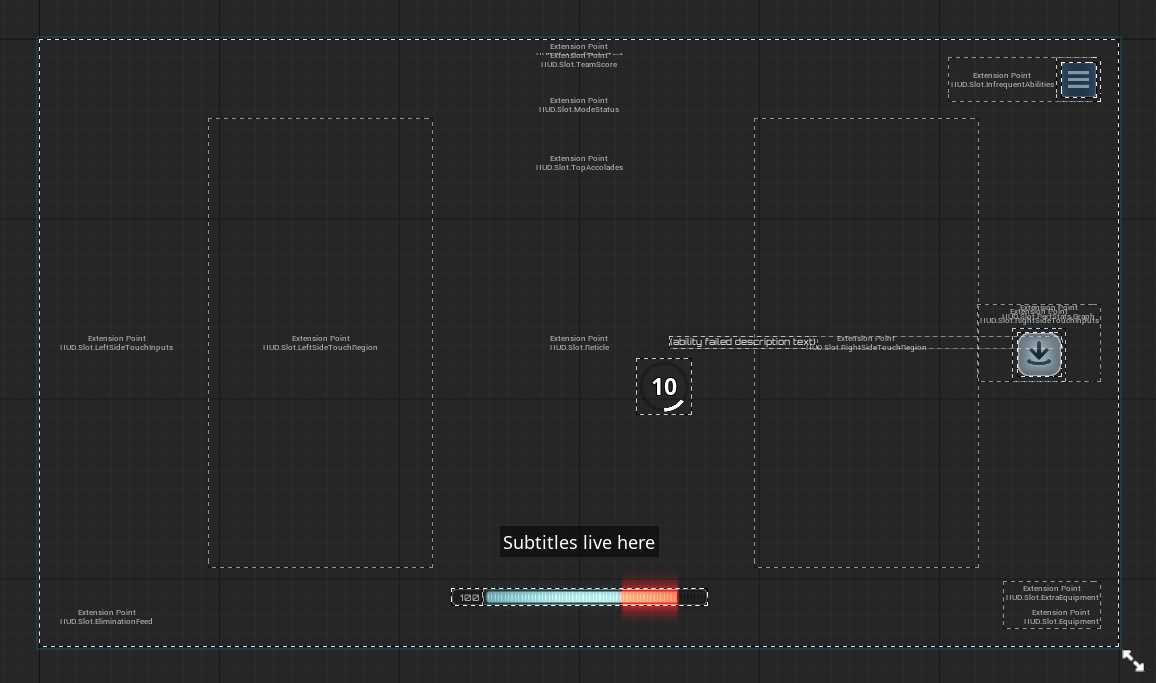
对应的类就是这个
推一个控件到一个tag上面
这里的点是 UUIExtensionPointWidget 这个点
UUIExtensionPointWidget/UUIExtensionSubsystem
UUIExtensionSubsystem
world subsystem
UCLASS(MinimalAPI)
class UUIExtensionSubsystem : public UWorldSubsystem
{
    GENERATED_BODY()
private:
    typedef TArray<TSharedPtr<FUIExtensionPoint>> FExtensionPointList;
    TMap<FGameplayTag, FExtensionPointList> ExtensionPointMap;

    typedef TArray<TSharedPtr<FUIExtension>> FExtensionList;
    TMap<FGameplayTag, FExtensionList> ExtensionMap;
};- ExtensionMap
第二个比较眼熟 ExtensionMap
GameFeatureAction_AddWidget中把
这个接口,吧TAG=>UI Class注册进来
ExtensionSubsystem->RegisterExtensionAsWidgetForContext(FGameplayTag, LocalPlayer, TSubclassOf
FUIExtensionHandle UUIExtensionSubsystem::RegisterExtensionAsData(const FGameplayTag& ExtensionPointTag, UObject* ContextObject, UObject* Data, int32 Priority)
{
    // check

    FExtensionList& List = ExtensionMap.FindOrAdd(ExtensionPointTag);

    TSharedPtr<FUIExtension>& Entry = List.Add_GetRef(MakeShared<FUIExtension>());
    Entry->ExtensionPointTag = ExtensionPointTag;
    Entry->ContextObject = ContextObject; // local player
    Entry->Data = Data; // UI class soft ptr
    Entry->Priority = Priority;

    // LOG

    NotifyExtensionPointsOfExtension(EUIExtensionAction::Added, Entry);

    return FUIExtensionHandle(this, Entry);
}- ExtensionPointMap
这个要从 UUIExtensionPointWidget看起
UCLASS(MinimalAPI)
class UUIExtensionPointWidget : public UDynamicEntryBoxBase
{
    // 这个扩展点的TAG
    UPROPERTY(EditAnywhere, BlueprintReadOnly, Category = "UI Extension")
    FGameplayTag ExtensionPointTag;

    // 如何匹配,全部匹配还是局部
    UPROPERTY(EditAnywhere, BlueprintReadOnly, Category = "UI Extension")
    EUIExtensionPointMatch ExtensionPointTagMatch = EUIExtensionPointMatch::ExactMatch;

    // 构建的类允许的类型,默认有一个UserWidget,如果不是,就可以这里自定义
    UPROPERTY(EditAnywhere, BlueprintReadOnly, Category = "UI Extension")
    TArray<TObjectPtr<UClass>> DataClasses;

    // 构建的类转换Userwidget失败了,你需要自定义一个接口让他能转成UserWidget
    UPROPERTY(EditAnywhere, BlueprintReadOnly, Category="UI Extension", meta=( IsBindableEvent="True" ))
    FOnGetWidgetClassForData GetWidgetClassForData;

    // 同上,具体看代码
    UPROPERTY(EditAnywhere, BlueprintReadOnly, Category="UI Extension", meta=( IsBindableEvent="True" ))
    FOnConfigureWidgetForData ConfigureWidgetForData;

    // 向 UUIExtensionSubsystem 注册后会留一个句柄
    TArray<FUIExtensionPointHandle> ExtensionPointHandles;

    UPROPERTY(Transient)
    TMap<FUIExtensionHandle, TObjectPtr<UUserWidget>> ExtensionMapping;
};
构建的时候
void UUIExtensionPointWidget::RegisterExtensionPoint()
{
    if (UUIExtensionSubsystem* ExtensionSubsystem = GetWorld()->GetSubsystem<UUIExtensionSubsystem>())
    {
        // 允许的类,默认有一个 UUserWidget
        TArray<UClass*> AllowedDataClasses;
        AllowedDataClasses.Add(UUserWidget::StaticClass());
        AllowedDataClasses.Append(DataClasses);

        // 向 UUIExtensionSubsystem 注册自己
        // 注册了两次,区别是有无 LocalPlayer

        ExtensionPointHandles.Add(ExtensionSubsystem->RegisterExtensionPoint(
            ExtensionPointTag, ExtensionPointTagMatch, AllowedDataClasses,
            FExtendExtensionPointDelegate::CreateUObject(this, &ThisClass::OnAddOrRemoveExtension)
        ));

        ExtensionPointHandles.Add(ExtensionSubsystem->RegisterExtensionPointForContext(
            ExtensionPointTag, GetOwningLocalPlayer(), ExtensionPointTagMatch, AllowedDataClasses,
            FExtendExtensionPointDelegate::CreateUObject(this, &ThisClass::OnAddOrRemoveExtension)
        ));
    }
}
为什么是两次
// 1. 无 Context 注册 - 接收全局广播的 Extension
RegisterExtensionPoint(ExtensionPointTag, ...)

// 2. 带 Context 注册 - 只接收针对该 LocalPlayer 的 Extension
RegisterExtensionPointForContext(ExtensionPointTag, GetOwningLocalPlayer(), ...)
bool FUIExtensionPoint::DoesExtensionPassContract(const FUIExtension* Extension) const
{
const bool bMatchesContext =
(ContextObject.IsExplicitlyNull() && Extension->ContextObject.IsExplicitlyNull()) ||
ContextObject == Extension->ContextObject;
// ...
}这里要null==null或者local player==local player 来区分全局组测和local player的注册
注册匹配激活流程
┌─────────────────────────────────────────────────────────────────────────────┐
│                           UIExtension 系统架构                               │
├─────────────────────────────────────────────────────────────────────────────┤
│                                                                             │
│   ┌──────────────────┐              ┌──────────────────┐                   │
│   │ ExtensionPoint   │              │    Extension     │                   │
│   │ (槽位/接收方)     │◄────匹配────►│  (内容/发送方)    │                   │
│   │                  │              │                  │                   │
│   │ • Tag            │              │ • Tag            │                   │
│   │ • ContextObject  │              │ • ContextObject  │                   │
│   │ • Callback       │              │ • Data (Widget类)│                   │
│   └──────────────────┘              └──────────────────┘                   │
│            │                                  │                             │
│            └──────────┬───────────────────────┘                             │
│                       ▼                                                     │
│            ┌──────────────────┐                                            │
│            │ UIExtensionSubsystem │ (World Subsystem - 中央调度)            │
│            │                      │                                        │
│            │ • ExtensionPointMap  │ ← 所有已注册的槽位                       │
│            │ • ExtensionMap       │ ← 所有已注册的内容                       │
│            └──────────────────────┘                                        │
└─────────────────────────────────────────────────────────────────────────────┘
工作流程
- 注册
// UIExtensionPointWidget.cpp - 第 31-40 行
TSharedRef<SWidget> UUIExtensionPointWidget::RebuildWidget()
{
    if (!IsDesignTime() && ExtensionPointTag.IsValid())
    {
        ResetExtensionPoint();
        RegisterExtensionPoint();  // ← 注册槽位
        // ...
    }
}
void UUIExtensionPointWidget::RegisterExtensionPoint()
{
// 向 Subsystem 注册,告诉它:"我是一个槽位,Tag 是 XXX,我接受 UUserWidget 类型"
ExtensionPointHandles.Add(ExtensionSubsystem->RegisterExtensionPoint(
ExtensionPointTag, // 槽位标识
ExtensionPointTagMatch, // 匹配模式
AllowedDataClasses, // 允许的数据类型
FExtendExtensionPointDelegate::CreateUObject(this, &ThisClass::OnAddOrRemoveExtension) // 回调
));
}Subsystem 处理
FUIExtensionPointHandle UUIExtensionSubsystem::RegisterExtensionPointForContext(...)
{
    // 1. 创建 ExtensionPoint 对象
    TSharedPtr<FUIExtensionPoint>& Entry = List.Add_GetRef(MakeShared<FUIExtensionPoint>());
    Entry->ExtensionPointTag = ExtensionPointTag;
    Entry->Callback = MoveTemp(ExtensionCallback);  // 保存回调

    // 2. 存入 Map(按 Tag 索引)
    ExtensionPointMap.FindOrAdd(ExtensionPointTag).Add(Entry);

    // 3. 【关键】检查是否已有匹配的 Extension,有则立即通知
    NotifyExtensionPointOfExtensions(Entry);

    return FUIExtensionPointHandle(this, Entry);
}- 激活
// GameFeatureAction_AddWidget.cpp - 第 161-164 行
void UGameFeatureAction_AddWidgets::AddWidgets(AActor* Actor, FPerContextData& ActiveData)
{
    for (const FLyraHUDElementEntry& Entry : Widgets)
    {
        // 向 Subsystem 注册:"我有一个 Widget 类,要显示在 Tag=XXX 的槽位"
        ActorData.ExtensionHandles.Add(
            ExtensionSubsystem->RegisterExtensionAsWidgetForContext(
                Entry.SlotID,           // 目标槽位 Tag
                LocalPlayer,            // Context(哪个玩家)
                Entry.WidgetClass.Get(),// Widget 类
                -1                      // 优先级
            )
        );
    }
}
FUIExtensionHandle UUIExtensionSubsystem::RegisterExtensionAsData(...)
{
// 1. 创建 Extension 对象
TSharedPtr<FUIExtension>& Entry = List.Add_GetRef(MakeShared<FUIExtension>());
Entry->ExtensionPointTag = ExtensionPointTag;
Entry->Data = Data; // Widget 类存在这里
// 2. 存入 Map
ExtensionMap.FindOrAdd(ExtensionPointTag).Add(Entry);
// 3. 【关键】通知所有匹配的 ExtensionPoint
NotifyExtensionPointsOfExtension(EUIExtensionAction::Added, Entry);
return FUIExtensionHandle(this, Entry);
}- 匹配与通知
void UUIExtensionSubsystem::NotifyExtensionPointsOfExtension(EUIExtensionAction Action, TSharedPtr<FUIExtension>& Extension)
{
    // 根据 Tag 查找所有注册的 ExtensionPoint
    if (const FExtensionPointList* ListPtr = ExtensionPointMap.Find(Tag))
    {
        for (const TSharedPtr<FUIExtensionPoint>& ExtensionPoint : *ListPtr)
        {
            // 检查是否匹配(Tag + Context + 数据类型)
            if (ExtensionPoint->DoesExtensionPassContract(Extension.Get()))
            {
                // 【关键】调用 ExtensionPoint 的回调
                ExtensionPoint->Callback.ExecuteIfBound(Action, Request);
            }
        }
    }
}
bool FUIExtensionPoint::DoesExtensionPassContract(const FUIExtension* Extension) const
{
// 1. Context 必须匹配(null==null 或 相同对象)
const bool bMatchesContext =
(ContextObject.IsExplicitlyNull() && Extension->ContextObject.IsExplicitlyNull()) ||
ContextObject == Extension->ContextObject;
if (bMatchesContext)
{
// 2. 数据类型必须在允许列表中
for (const UClass* AllowedDataClass : AllowedDataClasses)
{
if (DataClass->IsChildOf(AllowedDataClass))
return true;
}
}
return false;
}- 创建和显示
void UUIExtensionPointWidget::OnAddOrRemoveExtension(EUIExtensionAction Action, const FUIExtensionRequest& Request)
{
    if (Action == EUIExtensionAction::Added)
    {
        // Request.Data 就是 Widget 类
        TSubclassOf<UUserWidget> WidgetClass(Cast<UClass>(Request.Data));

        // 【关键】创建 Widget 实例并添加到显示
        UUserWidget* Widget = CreateEntryInternal(WidgetClass);  // 继承自 UDynamicEntryBoxBase

        // 记录映射关系,用于后续移除
        ExtensionMapping.Add(Request.ExtensionHandle, Widget);
    }
    else  // Removed
    {
        // 从显示中移除
        UUserWidget* Extension = ExtensionMapping.FindRef(Request.ExtensionHandle);
        RemoveEntryInternal(Extension);
        ExtensionMapping.Remove(Request.ExtensionHandle);
    }
}
时序图
GameFeature激活                UIExtensionSubsystem              UIExtensionPointWidget
     │                               │                                    │
     │                               │         RebuildWidget()            │
     │                               │◄───────RegisterExtensionPoint()────│
     │                               │                                    │
     │                               │    存入 ExtensionPointMap          │
     │                               │    (Tag → ExtensionPoint)          │
     │                               │                                    │
     │   RegisterExtensionAsWidget() │                                    │
     │──────────────────────────────►│                                    │
     │                               │                                    │
     │                               │    存入 ExtensionMap               │
     │                               │    (Tag → Extension)               │
     │                               │                                    │
     │                               │    查找匹配的 ExtensionPoint        │
     │                               │    DoesExtensionPassContract()     │
     │                               │                                    │
     │                               │    OnAddOrRemoveExtension(Added)   │
     │                               │───────────────────────────────────►│
     │                               │                                    │
     │                               │                    CreateEntryInternal()
     │                               │                    Widget 显示出来! │
     │                               │                                    │
移除
Handle.Unregister()
    → Subsystem.UnregisterExtension()
        → NotifyExtensionPointsOfExtension(Removed, ...)
            → ExtensionPoint.Callback(Removed, ...)
                → OnAddOrRemoveExtension(Removed)
                    → RemoveEntryInternal()  // Widget 消失
总结
LyraUI
基于栈的分层级管理,加上基于tag的控件推送
关键代码:
- 推送界面: PushContentToLayer_ForPlayer() → PrimaryGameLayout::PushWidgetToLayerStack() → WidgetStack::AddWidget()
- 注册 HUD 元素: RegisterExtensionAsWidgetForContext() → NotifyExtensionPointsOfExtension() → DoesExtensionPassContract() 匹配 → 回调 OnAddOrRemoveExtension() → CreateEntryInternal() 创建并显示
- 移除: Handle.Unregister() → 回调 Action=Removed → RemoveEntryInternal()
TODO
UCommonUIExtensions
UCommonInputSubsystem