本质上是一个远程技能。在 C++里面维护了相关的代理
void UEqZeroGameplayAbility_RangedWeapon::ActivateAbility(const FGameplayAbilitySpecHandle Handle, const FGameplayAbilityActorInfo* ActorInfo, const FGameplayAbilityActivationInfo ActivationInfo, const FGameplayEventData* TriggerEventData)
{
    // 绑定 target data 回调
    OnTargetDataReadyCallbackDelegateHandle = MyAbilityComponent->AbilityTargetDataSetDelegate(CurrentSpecHandle, CurrentActivationInfo.GetActivationPredictionKey()).AddUObject(this, &ThisClass::OnTargetDataReadyCallback);

    // 更新武器的开火时间
    WeaponData->UpdateFiringTime();
}

void UEqZeroGameplayAbility_RangedWeapon::EndAbility(const FGameplayAbilitySpecHandle Handle, const FGameplayAbilityActorInfo* ActorInfo, const FGameplayAbilityActivationInfo ActivationInfo, bool bReplicateEndAbility, bool bWasCancelled)
{

    // 能力结束时,消耗目标数据并移除委托
    // 操作的是 ASC 的 这个 FGameplayAbilityReplicatedDataContainer AbilityTargetDataMap;
    MyAbilityComponent->AbilityTargetDataSetDelegate(CurrentSpecHandle, CurrentActivationInfo.GetActivationPredictionKey()).Remove(OnTargetDataReadyCallbackDelegateHandle);
    MyAbilityComponent->ConsumeClientReplicatedTargetData(CurrentSpecHandle, CurrentActivationInfo.GetActivationPredictionKey());
}
如果是Local control 的
会在蓝图里面 ULyraGameplayAbility_RangedWeapon::StartRangedWeaponTargeting
=》激活技能,绑定了相关代理,在蓝图里面调用 StartRangedWeaponTargeting
void UEqZeroGameplayAbility_RangedWeapon::StartRangedWeaponTargeting()
{
    // 预测窗口
    // 它告诉系统:接下来的操作(如造成伤害、消耗子弹)是我客户端先“猜”的,请在服务器确认前先暂时这么显示。
    // 如果没有客户端的 CallServerSetReplicatedTargetData 会有问题
    FScopedPredictionWindow ScopedPrediction(MyAbilityComponent, CurrentActivationInfo.GetActivationPredictionKey());
根据他的构造函数,相当于吧这个Key记录到 AbilitySystemComponent->ScopedPredictionKey 上了
RestoreKey 存了一下当前值,会在析构的时候改回去
FScopedPredictionWindow::FScopedPredictionWindow(UAbilitySystemComponent* AbilitySystemComponent, FPredictionKey InPredictionKey, bool InSetReplicatedPredictionKey /*=true*/)
{
    if (AbilitySystemComponent == nullptr)
    {
        return;
    }

    // This is used to set an already generated prediction key as the current scoped prediction key.
    // Should be called on the server for logical scopes where a given key is valid. E.g, "client gave me this key, we both are going to run Foo()".

    if (AbilitySystemComponent->IsNetSimulating() == false)
    {
        Owner = AbilitySystemComponent;
        check(Owner.IsValid());
        RestoreKey = AbilitySystemComponent->ScopedPredictionKey;
        AbilitySystemComponent->ScopedPredictionKey = InPredictionKey;
        ClearScopedPredictionKey = true;
        SetReplicatedPredictionKey = InSetReplicatedPredictionKey;
    }
}
我们在本地客户端 StartRangedWeaponTargeting
void UEqZeroGameplayAbility_RangedWeapon::StartRangedWeaponTargeting()
{
    // 【1】预测窗口
    FScopedPredictionWindow ScopedPrediction(MyAbilityComponent, CurrentActivationInfo.GetActivationPredictionKey());

    // 【2】进行某种规则的 射线检测
    TArray<FHitResult> FoundHits;
    PerformLocalTargeting(FoundHits);

    // 【3】 构建 TargetData
    FGameplayAbilityTargetDataHandle TargetData;
    TargetData.UniqueId = WeaponStateComponent ? WeaponStateComponent->GetUnconfirmedServerSideHitMarkerCount() : 0;

    if (FoundHits.Num() > 0)
    {
        const int32 CartridgeID = FMath::Rand();

        for (const FHitResult& FoundHit : FoundHits)
        {
            // 创建 GAS 标准的单点命中数据结构
            FEqZeroGameplayAbilityTargetData_SingleTargetHit* NewTargetData = new FEqZeroGameplayAbilityTargetData_SingleTargetHit();
            NewTargetData->HitResult = FoundHit;
            NewTargetData->CartridgeID = CartridgeID;

            TargetData.Add(NewTargetData);
        }
    }
中点是第三部 FGameplayAbilityTargetDataHandle
他Add的东西是 FGameplayAbilityTargetData 的子类
FEqZeroGameplayAbilityTargetData_SingleTargetHit 是我们自己的子类
TargetData 中有什么信息呢 GetUnconfirmedServerSideHitMarkerCount 未被确认的命中信息
    // 在本地先记录这次命中,以便在UI上立即显示(比如先画个白色的X)
    // 虽然还没经服务器确认,但为了手感需要即时反馈
    if (WeaponStateComponent != nullptr)
    {
        WeaponStateComponent->AddUnconfirmedServerSideHitMarkers(TargetData, FoundHits);
    }
在 UEqZeroWeaponStateComponent::AddUnconfirmedServerSideHitMarkers
将命中数据暂时存起来。 这样可以在等待服务器确认前就能立即在 UI 上做一些预表现(如果是需要极快响应的设计)。
但是这里似乎只是存一下。等后面服务器确认。
然后是
OnTargetDataReadyCallback(TargetData, FGameplayTag());void UEqZeroGameplayAbility_RangedWeapon::OnTargetDataReadyCallback(const FGameplayAbilityTargetDataHandle& InData, FGameplayTag ApplicationTag)
{
UAbilitySystemComponent* MyAbilityComponent = CurrentActorInfo->AbilitySystemComponent.Get();
check(MyAbilityComponent);
if (const FGameplayAbilitySpec* AbilitySpec = MyAbilityComponent->FindAbilitySpecFromHandle(CurrentSpecHandle))
{
// 开启预测窗口,用于网络同步时的平滑处理
FScopedPredictionWindow ScopedPrediction(MyAbilityComponent);
// 移动语义获取数据,避免拷贝。获取目标数据的所有权,以确保不会有游戏代码的回调在我们不知情的情况下使数据失效。
FGameplayAbilityTargetDataHandle LocalTargetDataHandle(MoveTemp(const_cast<FGameplayAbilityTargetDataHandle&>(InData)));
// 如果是客户端,必须调用这个函数 (本地控制,但是又不权威。我们只讨论DS客户端,他这里排除了单机模式和ListenServer的玩家1)
if (const bool bShouldNotifyServer = CurrentActorInfo->IsLocallyControlled() && !CurrentActorInfo->IsNetAuthority())
{
MyAbilityComponent->CallServerSetReplicatedTargetData(CurrentSpecHandle, CurrentActivationInfo.GetActivationPredictionKey(), LocalTargetDataHandle, ApplicationTag, MyAbilityComponent->ScopedPredictionKey);
}
// ...
}
// ...
}这里 CallServerSetReplicatedTargetData
绕绕绕最后会在服务器执行 OnTargetDataReadyCallback 这个代理,我们在Activate 注册的
OnTargetDataReadyCallbackDelegateHandle = MyAbilityComponent->AbilityTargetDataSetDelegate(
    CurrentSpecHandle, CurrentActivationInfo.GetActivationPredictionKey()).AddUObject(this,
    &ThisClass::OnTargetDataReadyCallback);
大致流程是这个的
客户端                                              服务器
  │                                                   │
  │  1. ActivateAbility()                              │
  │     ├─ 注册 AbilityTargetDataSetDelegate           │
  │     ├─ 更新 WeaponData->UpdateFiringTime()         │
  │     └─ 调用蓝图 (Super 触发蓝图逻辑)               │
  │                                                   │
  │  2. 蓝图调用 StartRangedWeaponTargeting()          │
  │     ├─ FScopedPredictionWindow 开启预测窗口         │
  │     ├─ PerformLocalTargeting() → 本地射线检测       │
  │     │   ├─ GetTargetingTransform (摄像机→焦点)      │
  │     │   └─ TraceBulletsInCartridge                  │
  │     │       └─ DoSingleBulletTrace × N颗子弹       │
  │     │           ├─ 线检测 (SweepRadius=0)           │
  │     │           └─ 容错检测 (SweepRadius>0)         │
  │     ├─ 构建 FGameplayAbilityTargetDataHandle       │
  │     ├─ WeaponStateComponent                         │
  │     │   ->AddUnconfirmedServerSideHitMarkers()     │
  │     │   (本地暂存命中, UI 先表现)                    │
  │     └─ 调用 OnTargetDataReadyCallback()             │
  │                                                   │
  │  3. OnTargetDataReadyCallback() [客户端]            │
  │     ├─ FScopedPredictionWindow                      │
  │     ├─ CallServerSetReplicatedTargetData ─────────►│ 4. 服务器收到 TargetData
  │     │   (RPC: 发送命中数据到服务器)                  │    ├─ AbilityTargetDataSetDelegate 触发
  │     ├─ CommitAbility (预测性扣弹药/CD)              │    │   OnTargetDataReadyCallback() [服务器]
  │     ├─ WeaponData->AddSpread()                     │    ├─ 服务器验证命中有效性
  │     └─ OnRangedWeaponTargetDataReady               │    ├─ WeaponStateComponent
  │         (蓝图: 播特效/应用GE伤害)                   │    │   ->ClientConfirmTargetData ──────────►
  │                                                   │    │   (Client RPC: 通知客户端确认结果)
  │  6. ClientConfirmTargetData_Implementation         │    ├─ CommitAbility (权威扣弹药/CD)
  │     ├─ 查找 UniqueId 匹配的未确认批次               │    ├─ WeaponData->AddSpread()
  │     ├─ 根据 HitReplaces 过滤无效命中               │    └─ OnRangedWeaponTargetDataReady
  │     ├─ 有效命中 → ActuallyUpdateDamageInstigatedTime│       (蓝图: 权威应用GE伤害)
  │     ├─ 加入 LastWeaponDamageScreenLocations        │
  │     └─ UI 显示确认后的命中标记 (如爆头变色)          │
  │                                                   │
  │  7. EndAbility()                                   │
  │     ├─ 移除 AbilityTargetDataSetDelegate           │
  │     └─ ConsumeClientReplicatedTargetData           │
Q1:Prediction Key 在哪里生成?
答案:客户端在技能激活时由 ASC 自动生成,使用一个全局递增的 int16 计数器。
引擎源码路径:GameplayPrediction.cpp
// 生成新key的核心——一个 static 局部递增计数器
void FPredictionKey::GenerateNewPredictionKey()
{
    static KeyType GKey = 1;    // KeyType = int16
    Current = GKey++;
    if (GKey <= 0) { GKey = 1; }  // 溢出处理
}

// 只在客户端生成(服务器返回无效key)
FPredictionKey FPredictionKey::CreateNewPredictionKey(const UAbilitySystemComponent* OwningComponent)
{
    FPredictionKey NewKey;
    if (OwningComponent->GetOwnerRole() != ROLE_Authority)
    {
        NewKey.GenerateNewPredictionKey();
    }
    return NewKey;
}
生成时机: InternalTryActivateAbility 中,对于 LocalPredicted 策略的技能,客户端会:
// AbilitySystemComponent_Abilities.cpp
else if (Ability->GetNetExecutionPolicy() == EGameplayAbilityNetExecutionPolicy::LocalPredicted)
{
    // ★ 这里的 true 参数表示 "可以生成新Key"
    FScopedPredictionWindow ScopedPredictionWindow(this, true);

    // 将这个Key设为当前技能激活的预测Key
    ActivationInfo.SetPredicting(ScopedPredictionKey);

    // 立即发RPC到服务器,携带这个Key
    CallServerTryActivateAbility(Handle, Spec->InputPressed, ScopedPredictionKey);

    // 本地先激活(预测执行)
    AbilitySource->CallActivateAbility(Handle, ActorInfo, ActivationInfo, ...);
}
所以流程是:
- 客户端
TryActivateAbility→InternalTryActivateAbility FScopedPredictionWindow(ASC, true)在构造时调用GenerateDependentPredictionKey()→GenerateNewPredictionKey()- Key 被存入
ASC->ScopedPredictionKey,同时设入ActivationInfo - 通过
CallServerTryActivateAbilityRPC 将 Key 发送给服务器 - 服务器收到后,用同一个 Key 设入自己的
ActivationInfo
之后我们的代码里用 CurrentActivationInfo.GetActivationPredictionKey() 获取的就是这个 Key。
Q2:FScopedPredictionWindow 具体做了什么?
答案:它是一个 RAII 作用域守卫,在构造时设置当前预测Key到ASC上,在析构时恢复旧Key并(服务器侧)确认该Key。
它有两个构造函数,分别用于客户端和服务器:
客户端构造函数 FScopedPredictionWindow(ASC, bCanGenerateNewKey=true)
// 保存旧Key
RestoreKey = ASC->ScopedPredictionKey;

// 生成新的依赖Key(Base 指向旧Key,Current 是新值)
ASC->ScopedPredictionKey.GenerateDependentPredictionKey();
作用: 在这个作用域内,所有预测操作(如 ApplyGameplayEffect、CallServerSetReplicatedTargetData)都会使用新生成的 ScopedPredictionKey,让 GAS 知道"这些操作属于同一个预测上下文"。
服务器构造函数 FScopedPredictionWindow(ASC, InPredictionKey)
// 保存旧Key
RestoreKey = ASC->ScopedPredictionKey;
// 设置客户端传来的Key
ASC->ScopedPredictionKey = InPredictionKey;
析构函数(关键!)
~FScopedPredictionWindow()
{
    // ★ 服务器侧:确认这个PredictionKey,通知客户端"我处理了这个预测"
    if (SetReplicatedPredictionKey && ScopedPredictionKey.IsValidKey())
    {
        ASC->ReplicatedPredictionKeyMap.ReplicatePredictionKey(ScopedPredictionKey);
        // 这会通过 FastArray 复制到客户端,触发 OnRep
        // 客户端收到后知道"服务器已确认这个Key对应的操作",从而保留预测结果
    }

    // 恢复之前的Key
    ASC->ScopedPredictionKey = RestoreKey;
}
总结 FScopedPredictionWindow 的三个职责:
| 职责 | 构造时 | 析构时 |
|---|---|---|
| 管理 Key 作用域 | 保存旧 Key,设置新 Key 到 ASC | 恢复旧 Key |
| 客户端:生成预测 Key | GenerateDependentPredictionKey() |
- |
| 服务器:确认预测 Key | - | ReplicatePredictionKey() 告知客户端 |
在我们代码里出现了两次:
// StartRangedWeaponTargeting() 里——客户端入口
FScopedPredictionWindow ScopedPrediction(MyAbilityComponent,
    CurrentActivationInfo.GetActivationPredictionKey());
// ↑ 这里用的是 "服务器版构造函数"(传入已有Key),不生成新Key
//   目的是把激活时的PredictionKey设为当前作用域的Key

// OnTargetDataReadyCallback() 里——客户端和服务器都走
FScopedPredictionWindow ScopedPrediction(MyAbilityComponent);
// ↑ 客户端:bCanGenerateNewKey 默认 true,会生成一个依赖Key
//   服务器:IsNetSimulating()==false,会设置并在析构时确认Key
Q3 这个预测窗口具体干了什么好像秀操作但是啥都没干
- High Level Goals / 高层目标
在 GameplayAbility 层面(实现某个 Ability 时),预测是透明的。一个 Ability 只需描述"执行 X→Y→Z",系统会自动对其中可以预测的部分进行预测。
我们希望避免在 Ability 内部出现"如果是权威端:执行 X;否则:执行 X 的预测版本"这样的逻辑。
- CommitAbility → 弹药/冷却的预测扣除
CommitAbility 内部调用 ApplyCost + ApplyCooldown,它们都是 ApplyGameplayEffectSpecToSelf。因为此时在 FScopedPredictionWindow 作用域内,这些 GE 被标记了 PredictionKey。
如果没有预测:客户端开枪后弹药数不变,等 100ms 服务器回包才扣弹——玩家会觉得"卡"。
有预测后:客户端开枪瞬间弹药 -1,服务器确认后属性复制下来,GAS 自动做 reconcile:
- 预测对了 → 无感过渡(删掉预测的 GE,保留服务器的 GE,数值一样)
- 预测错了(比如服务器判定技能失败)→ 自动回滚弹药
- 属性的 REPNOTIFY_Always → 解决 "Override" 问题
EqZeroHealthSet.cpp:
DOREPLIFETIME_CONDITION_NOTIFY(UEqZeroHealthSet, Health, COND_None, REPNOTIFY_Always);

void UEqZeroHealthSet::OnRep_Health(const FGameplayAttributeData& OldValue)
{
    GAMEPLAYATTRIBUTE_REPNOTIFY(UEqZeroHealthSet, Health, OldValue);
}这不是"写着好看"。REPNOTIFY_Always 让每次服务器推值客户端都触发 OnRep(即使本地值没变)。GAMEPLAYATTRIBUTE_REPNOTIFY 宏做的事:
服务器推下来 Health = 80(BaseValue)
客户端本地有一个预测的 -10 GE(PredictionKey = 5)
→ FinalValue = 80 + (-10) = 70  //显示给玩家的值

当 PredictionKey 5 被确认/拒绝:
  确认 → 删掉预测GE,服务器GE到位,最终还是 70
  拒绝 → 删掉预测GE,回到 80
如果不用 REPNOTIFY_Always:当服务器推下来的值碰巧和客户端本地值一样,OnRep 不触发,属性聚合链就不会重建,预测的增量就永远卡在那里。
- Montage 预测 → 动画即时反应
你的近战和闪避都用了 UAbilityTask_PlayMontageAndWait。这个引擎 Task 内部 自动开了 FScopedPredictionWindow,做了以下事情:
客户端立即播放蒙太奇(不等服务器)
通过 RPC 通知服务器播同一个蒙太奇
服务器确认后,Multicast 给其他客户端看到动画
发起客户端因为有 PredictionKey,收到 Multicast 时跳过(避免"Redo"——动画播两遍)
如果没有预测:按下闪避键,100ms后才开始播动画——MOBA可以接受,FPS不行。
- GameplayCue 的去重 → 不重复播特效
当一个带 GameplayCue 的 GE 被预测应用时:
客户端预测应用 GE → 本地触发 GameplayCue(播枪口火焰、音效)
服务器应用相同 GE → Multicast GameplayCue → 客户端收到

关键:客户端收到 Multicast 时检查 PredictionKey:
  "这个 Cue 和我预测的Key一样?跳过!不重复播。"
如果没有预测:特效要么延迟100ms播放(等服务器),要么播两遍(本地一次+服务器推一次)。
- 你的 ApplyCost 里的 ShouldOnlyApplyCostOnHit → 服务器权威
你项目基类里有一段很有意思的设计:
void UEqZeroGameplayAbility::ApplyCost(...) const
{
    // 只有服务器能判断"是否命中"来决定要不要扣特殊Cost
    if (AdditionalCost->ShouldOnlyApplyCostOnHit())
    {
        if (ActorInfo->IsNetAuthority())  // ← 只在服务器检查
        {
            // 查 TargetData 是否有命中
            bAbilityHitTarget = DetermineIfAbilityHitTarget();
        }
        if (!bAbilityHitTarget) continue; // 客户端跳过
    }
    AdditionalCost->ApplyCost(...);
}
这里故意不预测"命中才扣"的 Cost——因为客户端不知道服务器会不会认可命中结果。普通 Cost(弹药)可以安全预测,特殊 Cost(命中才扣的资源)只在服务器扣,避免预测错误导致资源异常。
总结:
更"复杂"的场景在哪?
你文档里提到但项目还没碰到的几个硬骨头:
-
Meta Attribute(伤害/治疗)不能预测 — 你的 EqZeroDamageExecution 包在 WITH_SERVER_CODE 里,只在服务器跑。所以客户端不预测伤害数值(Health 的变化完全等服务器推),只预测"弹药消耗"和"开火特效"。这是故意的——伤害预测错了要回滚血条很丑。
-
GE 移除不能预测 — 如果你做一个"护盾 Buff,被打时移除",客户端不能预测性移除这个 GE。这意味着护盾破碎特效要么等服务器、要么走自定义逻辑。
-
链式技能依赖 — 你的连招如果是 GA_Attack1 → GA_Attack2,如果 Attack1 被服务器否了,Attack2 不会自动回滚。防御做法是用 Tag:Attack2 要求有 Combo.Stage1 Tag(由 Attack1 的 GE 赋予),服务器否了 Attack1 就没这个 Tag,Attack2 自然激活不了。
-
百分比 GE 偏差 — 客户端只知道属性最终值(550),不知道组成(500 base + 10% buff)。再预测一个 10% buff 会基于 550 算出 605 而不是正确的 600。
-
GAS 预测 = 引擎自动对 GE/属性/Cue/蒙太奇做的"先执行后确认"机制,基于 PredictionKey
-
TargetData = 你自定义的"客户端算出命中→发给服务器→服务器验证→回 RPC"流程,和预测是独立的
Q4:为什么有的技能开了 LocalPredicted 但没用预测窗口?
因为 ActivateAbility 本身就在一个预测窗口里。引擎在 <font style="color:rgb(209, 154, 102);background-color:rgba(255, 255, 255, 0.1);">InternalTryActivateAbility</font> 里已经开了:
// 引擎代码 AbilitySystemComponent_Abilities.cpp
FScopedPredictionWindow ScopedPredictionWindow(this, true); // ← 引擎自动开的
ActivationInfo.SetPredicting(ScopedPredictionKey);
CallServerTryActivateAbility(...);
AbilitySource->CallActivateAbility(...); // ← 你的 ActivateAbility 在这个窗口内
所以你的 Dash 和 Melee 的 ActivateAbility 里直接调 CommitAbility、创建 PlayMontageAndWait Task,它们全都自动继承了这个预测窗口的 PredictionKey。不需要你手动开。
你需要手动开 FScopedPredictionWindow 的唯一场景:ActivateAbility 的调用栈结束之后,还想做预测操作。比如 RangedWeapon 的 StartRangedWeaponTargeting 是蓝图在后续帧调用的,已经不在激活窗口里了,所以必须手动开。
开发中需要注意的规则清单:
规则 1:预测窗口 = ActivateAbility 的同步调用栈
✅ ActivateAbility() {
    CommitAbility();         // 在窗口内,预测生效
    PlayMontageAndWait();    // Task 创建在窗口内,预测生效
    ApplyGE();               // 在窗口内,预测生效
}

❌ ActivateAbility() {
    WaitDelay(1.0s) → {
        CommitAbility();     // 1秒后,窗口早关了,PredictionKey 无效
    }                        // GAS 会打印警告,GE 不会被预测
}
定时器、Delay、WaitTargetData、WaitInputRelease 等会跨帧,一旦跨帧,激活窗口就关闭了。在回调里要做预测操作,必须手动开 FScopedPredictionWindow 并有配套的 Server RPC。
规则 2:你需要手动开预测窗口的场景
客户端在某个异步回调里想做预测操作
→ 手动开 FScopedPredictionWindow
→ 同时有一个 Server RPC 在服务器侧也开 FScopedPredictionWindow + 同样的逻辑

必须保证:客户端回调 → ServerRPC → 服务器回调 这条链路上执行的代码对称
你的 RangedWeapon 就是这个模式:
- StartRangedWeaponTargeting → 手动窗口
- OnTargetDataReadyCallback →
CallServerSetReplicatedTargetDataRPC → 服务器ServerSetReplicatedTargetData_Implementation自动开窗口 → 服务器的 OnTargetDataReadyCallback
规则 3:不要在服务器 RPC 里重复 CommitAbility
// ❌ Dash 当前写法
void ActivateAbility() {
    CommitAbility();  // 客户端预测扣费
    ServerSendInfo(); // RPC
}
void ServerSendInfo_Implementation() {
    CommitAbility();  // 服务器又扣一次 ← 可能双扣
    ExecuteDash();
}

// ✅ 正确写法
void ActivateAbility() {
    CommitAbility();  // 两端都会执行(客户端预测 + 引擎在服务器confirm时执行)
    if (!HasAuthority()) ServerSendInfo();
}
void ServerSendInfo_Implementation() {
    // 不再 CommitAbility,只同步执行效果
    ExecuteDash();
}
规则 4:Execution(伤害计算)不预测
你的 EqZeroDamageExecution 在 WITH_SERVER_CODE 里,这是正确的。Execution 类不支持预测(文档里写了)。伤害数值变化(Health 减少)完全由服务器推下来,客户端通过 REPNOTIFY_Always + GAMEPLAYATTRIBUTE_REPNOTIFY 做 reconcile。
如果你想客户端预测伤害数字显示,需要绕过 Execution,用普通 Modifier(Add/Multiply)而不是 Execution。但一般不建议——预测伤害错了回滚血条很丑。
规则 5:GE 移除不可预测
// ❌ 客户端不能预测性移除 GE
ASC->RemoveActiveGameplayEffect(Handle);   // 只在服务器有效

// ✅ 如果需要客户端有即时反馈,用 GameplayCue 做视觉表现
// 逻辑层面等服务器移除 → 属性复制 → OnRep 回调
规则 6:Tag 操作注意 Loose 和 GE Tag 的区别
你 Reload 里的 ASC->AddLooseGameplayTag(TAG_WeaponFireBlocked) 不走预测系统——Loose Tag 是直接加的,没有 PredictionKey。如果客户端加了,服务器不知道。建议改用短时 GE 赋 Tag 的方式,这样 Tag 的添加/移除会走 GAS 预测流程。
Q5 Redo/Undo 有点抽象呀
什么情况用,对于开发有什么影响
客户端预测激活技能 → 服务器判定
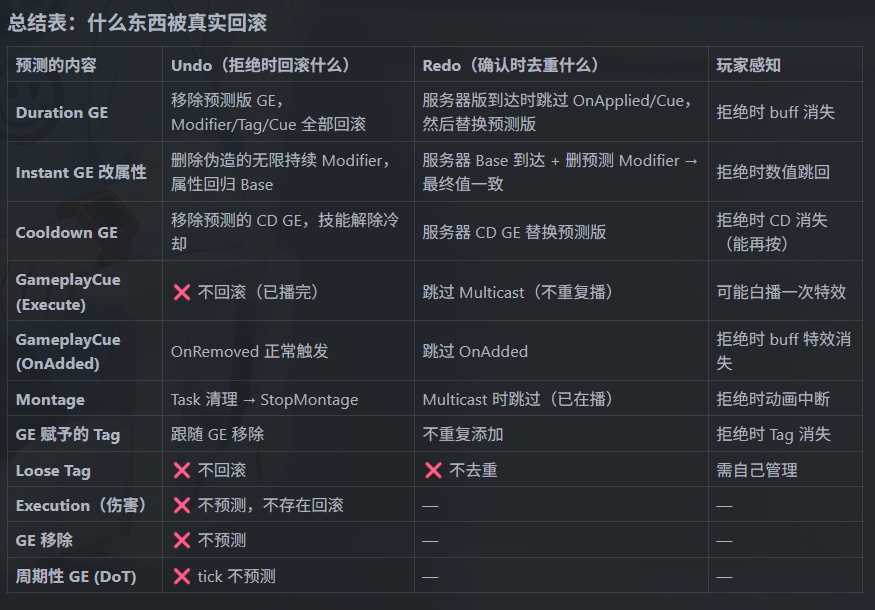
 ├─ 服务器拒绝 (ClientActivateAbilityFailed) → 触发 Undo(回滚一切)
 └─ 服务器确认 (Succeed + ReplicatedPredictionKey 追上来)
      → 触发 Redo(去重,不重复执行副作用)
      → 然后删掉预测版本,保留服务器版本
关键认知:确认成功时也有"回滚"——只不过是安静地用服务器版本替换预测版本,玩家无感。
GE(GameplayEffect)的 Undo/Redo
场景:客户端预测给自己加一个 10 秒减速 Debuff
预测阶段(客户端先行):
客户端 ActiveGameplayEffects:
  [0] SlowDebuff (PredictionKey=7, 客户端预测版)
       → Tag: Status.Slow 已生效
       → GameplayCue: GC_Slow 已播放(紫色特效)
       → 移速属性 -30%
Redo 路径(服务器确认成功)
1. 服务器也 Apply 了 SlowDebuff,设了 PredictionKey=7,复制下来
2. 客户端收到复制的 FActiveGameplayEffect (PredictionKey=7)
3. 客户端检查:本地已有 PredictionKey=7 的 GE? → 有!
4. ★ 跳过 "OnApplied" 逻辑(不重复播 GC_Slow 特效)
5. 此时 ActiveGameplayEffects 里有两个 SlowDebuff(预测版 + 服务器版)
6. ReplicatedPredictionKey 追上来 → 删除预测版 SlowDebuff
7. ★ 删除时检查 PredictionKey:这是预测版被清理,跳过 "OnRemoved" 逻辑(不播移除特效)
8. 最终只剩服务器版 SlowDebuff,玩家全程无感
Undo 路径(服务器拒绝)
1. 服务器判定技能激活失败 → ClientActivateAbilityFailed
2. PredictionKey=7 被 Reject
3. 查找所有 PredictionKey=7 的 FActiveGameplayEffect → 找到预测版 SlowDebuff
4. ★ 移除它:
   - Tag Status.Slow 被移除
   - 移速属性恢复(-30% 的 Modifier 被删)
   - GameplayCue GC_Slow 的 OnRemoved 执行(紫色特效消失)
5. 玩家看到:减速特效闪了一下就消失了(这就是预测失败的回滚)
属性(Attribute)的 Undo/Redo
场景:客户端预测扣 10 点蓝(CommitAbility 扣 Cost)
GAS 对即时 GE(Instant)做了特殊处理:预测时将其视为无限持续时间 GE。
预测阶段:
服务器上 Mana = 100(这是复制下来的值)
客户端预测:Apply 一个 "Mana -10" 的即时 GE
→ GAS 不直接改 Mana 为 90
→ 而是创建一个 "无限持续时间的 Mana -10 Modifier" (PredictionKey=7)
→ 客户端显示 Mana = 100(Base) + (-10)(预测Modifier) = 90
Redo 路径(确认成功)
1. 服务器执行了该 GE,Mana 从 100 变成 90
2. 服务器复制 Mana=90 到客户端
3. 客户端 OnRep_Mana 触发(REPNOTIFY_Always 保证一定触发)
4. GAMEPLAYATTRIBUTE_REPNOTIFY 宏执行:
   - 设新的 BaseValue = 90
   - 重新聚合:90(新Base) + (-10)(预测Modifier) = 80 ← 暂时多扣了!
5. 但几乎同时,ReplicatedPredictionKey 追上来
6. PredictionKey=7 confirmed → 删除预测的 -10 Modifier
7. 重新聚合:90(Base) + 0 = 90 ✅
8. 玩家看到:90 → 短暂 80 → 90,但因为几乎同帧,实际无感
Undo 路径(拒绝)
1. 服务器拒绝 → PredictionKey=7 Rejected
2. 删除预测的 -10 Modifier
3. 重新聚合:100(Base) + 0 = 100
4. 玩家看到:蓝从 90 跳回 100(回滚)
为什么伤害(Health)不预测?
如果客户端预测"敌人 Health -50":
预测:敌人血条从 100 → 50(播放受击动画、血条动画)
服务器拒绝:血条从 50 → 100 跳回
→ 玩家看到敌人血条先掉后涨,非常诡异
而弹药/蓝量:
预测:弹药从 30 → 29
服务器拒绝:弹药从 29 → 30 跳回
→ 玩家几乎注意不到(HUD 上一个小数字闪了一下)
代价不对称:属性回滚的视觉冲击越大,越不应该预测。
所以还是开发者决策。
GameplayCue 的 Undo/Redo
独立 Cue(不跟随 GE)
// 在预测窗口内调用
ASC->ExecuteGameplayCue(TAG_GC_MuzzleFlash, CueParams);
客户端(有 PredictionKey):直接播放枪口火焰
服务器:执行 Multicast → 所有客户端收到
发起客户端收到 Multicast 时:检查有 PredictionKey → 跳过(Redo 去重)
其他客户端:正常播放
Undo?
Execute 类型的 Cue 是"一次性"的(爆炸特效、音效),播完就播完了,无法回滚。这是 "Fire and forget"。所以即使技能被拒绝,枪口火焰已经播了——这是可接受的视觉妥协。
跟随 GE 的 Cue(OnAdded/OnRemoved)
GE 预测应用 → Cue OnAdded 播放(头上冒 buff 图标)
GE Redo(服务器版到达)→ 跳过 OnAdded(不重复播)
GE 预测版被清理 → 跳过 OnRemoved(不播移除动画)
GE 被拒绝 → Cue OnRemoved 正常播放(buff 图标消失)
蒙太奇(Montage)的 Undo/Redo
Redo
PlayMontageAndWait Task 创建时在预测窗口内:
客户端:立即播放蒙太奇
服务器:确认后 Multicast 播放同一蒙太奇
客户端收到 Multicast:检查 PredictionKey → 跳过(动画已在播了)
Undo
技能被拒绝时:
1. 技能 EndAbility(bWasCancelled=true)
2. AbilityTask 全部关闭
3. PlayMontageAndWait 的清理逻辑 → StopMontage
4. 玩家看到:动画播了一半突然停止(这是回滚的"丑"之一)
Tag 的 Undo/Redo
来自 GE 的 Tag(GrantedTags)跟随 GE 一起生死:
GE 预测应用 → Tag 生效
GE Redo → Tag 不重复添加(已经有了)
GE 预测版被清理 → 但服务器版 GE 已到位,Tag 仍然保持
GE 被拒绝 → Tag 跟着移除
Loose Tag(AddLooseGameplayTag)不参与预测系统,不会自动 Undo/Redo。
实际开发中的决策原则
应该预测的(回滚代价小):
- 弹药消耗(数字闪一下无所谓)
- 冷却(回滚后能再按,玩家不觉得奇怪)
- 自身 buff 添加(图标闪一下可接受)
- 枪口火焰/音效(Execute Cue,播了就播了)
- 自身蒙太奇(开火/挥刀动画要即时)
不应该预测的(回滚代价大):
- 他人血量变化(血条先掉后涨很丑)
- 击杀判定(先显示击杀再撤回?灾难)
- 掉落/拾取(物品先出现再消失?)
- 永久状态变更(装备升级等)
灰色地带(看项目需求决定):
- 自身血量变化(被打时预测扣血?回滚会导致血条波动)
- 移速 buff(预测加速后回滚减速会有 "拉扯感")
- 护盾(预测消耗护盾后回滚会看到护盾先碎后修复)