找L_ShooterGym -> 体验 -> pawn data 里面有 pawn class
找到 /ShooterCore/Game/B_Hero_ShooterMannequin.B_Hero_ShooterMannequin
这是一个看不见的mesh
他会用这个随机一个模型只有骨骼
/Game/Characters/Cosmetics/B_PickRandomCharacter.B_PickRandomCharacter
走 Add Character Part
装扮的逻辑
就是
/Game/Characters/Cosmetics/B_Manny.B_Manny
/Game/Characters/Cosmetics/B_Quinn.B_Quinn
他的动画蓝图是 /Game/Characters/Heroes/Mannequin/Animations/ABP_Mannequin_CopyPose.ABP_Mannequin_CopyPose
这里面copy pose from mesh
旁边还有一个重定向的,应该是retarget这个才对吧?暂时没搞懂
/Game/Characters/Heroes/Mannequin/Animations/ABP_Mannequin_Retarget.ABP_Mannequin_Retarget
反正我们找到了角色类和父类,三个蓝图上去到了 lyra character
ALyraPawn
看一个类先看数据,维护了队伍ID,实际没用到。
逻辑就是 PossessedBy 和 UnPossessed 的时候从controller获取删除一下队伍信息,然后广播一下
/**
 * ALyraPawn
 */
UCLASS(MinimalAPI)
class ALyraPawn : public AModularPawn, public ILyraTeamAgentInterface
{
    GENERATED_BODY()
private:
    UPROPERTY(ReplicatedUsing = OnRep_MyTeamID)
    FGenericTeamId MyTeamID;

    UPROPERTY()
    FOnLyraTeamIndexChangedDelegate OnTeamChangedDelegate;
};
带 AModularPawn 的类
在 ModularGameplayActors 这个包下,是为了向 UGameFrameworkComponentManager 注册。
以便于Game Feature 例如 UGameFeatureAction_AddComponents 能够例如往某个类加某个组件的时候,能够找到这个类
void AModularPawn::PreInitializeComponents()
{
    Super::PreInitializeComponents();

    UGameFrameworkComponentManager::AddGameFrameworkComponentReceiver(this);
}

void AModularPawn::BeginPlay()
{
    UGameFrameworkComponentManager::SendGameFrameworkComponentExtensionEvent(this, UGameFrameworkComponentManager::NAME_GameActorReady);

    Super::BeginPlay();
}

void AModularPawn::EndPlay(const EEndPlayReason::Type EndPlayReason)
{
    UGameFrameworkComponentManager::RemoveGameFrameworkComponentReceiver(this);

    Super::EndPlay(EndPlayReason);
}
ALyraCharacter
这个文件
/**
 * ALyraCharacter
 *
 *  The base character pawn class used by this project.
 *  Responsible for sending events to pawn components.
 *  New behavior should be added via pawn components when possible.
 */
UCLASS(MinimalAPI, Config = Game, Meta = (ShortTooltip = "The base character pawn class used by this project."))
class ALyraCharacter : public AModularCharacter, public IAbilitySystemInterface, public IGameplayCueInterface, public IGameplayTagAssetInterface, public ILyraTeamAgentInterface
{
    GENERATED_BODY()

};
IAbilitySystemInterface 实现了获取GAS, ASC的接口
IGameplayCueInterface 希望actor能回调到 gameplay effect 的 game cue event
IGameplayTagAssetInterface 封装让角色能直接查询访问到ASC的tag,提过了全匹配,部分匹配的接口
ILyraTeamAgentInterface 队伍相关
基本内容
- 关闭tick,子类有需要再开
- UCapsuleComponent,USkeletalMeshComponent 初始化,并设置碰撞预设
- ULyraCharacterMovementComponent 移动组件初始化,数值设置
- ULyraPawnExtensionComponent 是一个 pawn component
逻辑解耦,有一个pawn data,在讲体验的时候。我们知道pawn data 是一个配置包括pawn class, 技能集合和关系映射,输入配置,和摄像机模式。
这里主要是分管了一些 ASC 初始化,摧毁的逻辑。后面展开。
- ULyraHealthComponent
生命值组件,里面维护了 ULyraHealthSet,就是GAS那个 attr set 的子类。还有一些死亡状态事件相关的逻辑
- ULyraCameraComponent
父类 UCameraComponent,里面是 ULyraCameraModeStack,摄像机现在先不展开。
- ULyraSignificanceManager
目前不太重要,特征管理器,例如用于重要和不重要的角色有不同tick频率,但是lyra没实现完
- ReplicatedAcceleration
通过转极坐标来压缩加速度为3个uint8,作为网络优化
- FSharedRepMovement
    /** RPCs that is called on frames when default property replication is skipped. This replicates a single movement update to everyone. */
    UFUNCTION(NetMulticast, unreliable)
    UE_API void FastSharedReplication(const FSharedRepMovement& SharedRepMovement);

    // 发送的 FSharedRepMovement 存一下, 避免重复发
    FSharedRepMovement LastSharedReplication;
void ULyraReplicationGraph::InitGlobalActorClassSettings()
{
// ...
// ------------------------------------------------------------------------------------------------------
// Setup FastShared replication for pawns. This is called up to once per frame per pawn to see if it wants
// to send a FastShared update to all relevant connections.
// ------------------------------------------------------------------------------------------------------
CharacterClassRepInfo.FastSharedReplicationFunc = [](AActor* Actor)
{
bool bSuccess = false;
if (ALyraCharacter* Character = Cast<ALyraCharacter>(Actor))
{
bSuccess = Character->UpdateSharedReplication(); // 从这里过来
}
return bSuccess;
};
}到 lyra character 的 UpdateSharedReplication 就是填充数据,看看和上一帧是不是一样,然后发出去。
FastSharedReplication_Implementation
- 另外就是一些从controler赋值过来的队伍接口,和一些其他的转发逻辑这个类就不详细看了。到具体看组件的时候在关联逻辑
ULyraCharacterMovementComponent
内容比较少
刚刚character的,自己维护了一个加速度转极坐标的压缩。关闭了引擎的加速度(哪里关的?)。然后用这个
    UPROPERTY(Transient, ReplicatedUsing = OnRep_ReplicatedAcceleration)
    FLyraReplicatedAcceleration ReplicatedAcceleration;
在这里覆盖引擎的加速度计算流程。
void ULyraCharacterMovementComponent::SimulateMovement(float DeltaTime)
{
    if (bHasReplicatedAcceleration)
    {
        // Preserve our replicated acceleration
        const FVector OriginalAcceleration = Acceleration;
        Super::SimulateMovement(DeltaTime);
        Acceleration = OriginalAcceleration;
    }
    else
    {
        Super::SimulateMovement(DeltaTime);
    }
}
- ULyraCharacterMovementComponent::GetGroundInfo
通过射线维护一到到地面的距离以及缓存一下。
GetDeltaRotation,GetMaxSpeed 是移动组件的重写函数,通过ASC Tag返回0值。
什么时候有这个tag暂时不知道。
ULyraAnimInstance
好短一动画蓝图。。。
UCLASS(Config = Game)
class ULyraAnimInstance : public UAnimInstance
{
    GENERATED_BODY()
    // ...
protected:

    // Gameplay tags that can be mapped to blueprint variables. The variables will automatically update as the tags are added or removed.
    // These should be used instead of manually querying for the gameplay tags.
    UPROPERTY(EditDefaultsOnly, Category = "GameplayTags")
    FGameplayTagBlueprintPropertyMap GameplayTagPropertyMap;

    UPROPERTY(BlueprintReadOnly, Category = "Character State Data")
    float GroundDistance = -1.0f;
};
GroundDistance 他想要地面信息,就上面移动组件里面的。
GameplayTagPropertyMap
/**
用于管理游戏玩法标签蓝图属性映射的结构体。
它通过能力系统组件上的委托来注册属性。
此结构体不能在容器(如 TArray)中使用,因为它使用原始指针来绑定委托,
其地址可能会发生变化,从而导致绑定无效。
 */
USTRUCT()
struct FGameplayTagBlueprintPropertyMap
{
    GENERATED_BODY()
    // ...
protected:

    TWeakObjectPtr<UObject> CachedOwner;
    TWeakObjectPtr<UAbilitySystemComponent> CachedASC;

    UPROPERTY(EditAnywhere, Category = GameplayTagBlueprintProperty)
    TArray<FGameplayTagBlueprintPropertyMapping> PropertyMappings;
};
通过查询tag来修改bool值。
对于这个anim ins 的函数逻辑就是,初始化的时候绑定一下ASC
FGameplayTagBlueprintPropertyMapping 这里面就是很多属性可以配置了。一会看。
我们先看map是如何注册的
void FGameplayTagBlueprintPropertyMap::Initialize(UObject* Owner, UAbilitySystemComponent* ASC)
{
    // ... some check

    CachedOwner = Owner; // anin instance
    CachedASC = ASC;

    FOnGameplayEffectTagCountChanged::FDelegate Delegate = FOnGameplayEffectTagCountChanged::FDelegate::CreateRaw(this, &FGameplayTagBlueprintPropertyMap::GameplayTagEventCallback, CachedOwner);

    // Process array starting at the end so we can remove invalid entries.
    // 遍历我们动画蓝图的配置
    for (int32 MappingIndex = (PropertyMappings.Num() - 1); MappingIndex >= 0; --MappingIndex)
    {
        // 这个就是具体的tag结构
        FGameplayTagBlueprintPropertyMapping& Mapping = PropertyMappings[MappingIndex];

        if (Mapping.TagToMap.IsValid())
        {
            // 寻找属性
            FProperty* Property = OwnerClass->FindPropertyByName(Mapping.PropertyName);
            if (Property && IsPropertyTypeValid(Property))
            {
                // 设置属性,和属性变化代理
                Mapping.PropertyToEdit = Property;
                Mapping.DelegateHandle = ASC->RegisterAndCallGameplayTagEvent(Mapping.TagToMap, Delegate, GetGameplayTagEventType(Property));
                continue;
            }
        }

        // 正确的属性前面continue了,这里就是LOG和删除
        PropertyMappings.RemoveAtSwap(MappingIndex, EAllowShrinking::No);
    }
}
这里会看到,tag事件会触发数值变化,但是只有这三个类型吗?继续看下去
void FGameplayTagBlueprintPropertyMap::GameplayTagEventCallback(const FGameplayTag Tag, int32 NewCount, TWeakObjectPtr<UObject> RegisteredOwner)
{
    // ...

    if (Mapping && Mapping->PropertyToEdit.Get())
    {
        if (const FBoolProperty* BoolProperty = CastField<const FBoolProperty>(Mapping->PropertyToEdit.Get()))
        {
            BoolProperty->SetPropertyValue_InContainer(Owner, NewCount > 0);
        }
        else if (const FIntProperty* IntProperty = CastField<const FIntProperty>(Mapping->PropertyToEdit.Get()))
        {
            IntProperty->SetPropertyValue_InContainer(Owner, NewCount);
        }
        else if (const FFloatProperty* FloatProperty = CastField<const FFloatProperty>(Mapping->PropertyToEdit.Get()))
        {
            FloatProperty->SetPropertyValue_InContainer(Owner, (float)NewCount);
        }
    }
}
ULyraPawnExtensionComponent
Game Framework Component Manager
就是这堆东西
void AModularCharacter::PreInitializeComponents()
{
    Super::PreInitializeComponents();

    UGameFrameworkComponentManager::AddGameFrameworkComponentReceiver(this);
}

void AModularCharacter::BeginPlay()
{
    UGameFrameworkComponentManager::SendGameFrameworkComponentExtensionEvent(this, UGameFrameworkComponentManager::NAME_GameActorReady);

    Super::BeginPlay();
}

void AModularCharacter::EndPlay(const EEndPlayReason::Type EndPlayReason)
{
    UGameFrameworkComponentManager::RemoveGameFrameworkComponentReceiver(this);

    Super::EndPlay(EndPlayReason);
}
前面通过看数据发现,这个类是维护pawn data,然后是一些分管技能的业务。
现在具体看看
/**
 * Component that adds functionality to all Pawn classes so it can be used for characters/vehicles/etc.
 * This coordinates the initialization of other components.
 */
UCLASS(MinimalAPI)
class ULyraPawnExtensionComponent : public UPawnComponent, public IGameFrameworkInitStateInterface
{
    GENERATED_BODY()

    /** 这个整体功能的名称,它依赖于其他已命名的组件功能。 */
    static UE_API const FName NAME_ActorFeatureName;
};
lyra希望一个组件一个功能,所以 NAME_ActorFeatureName (其他的component也能找到同名变量)
IGameFrameworkInitStateInterface 的使用,例如 lyra hero comp 和 lyra pawn ext comp
在重写的 OnRegister 最后调用 RegisterInitStateFeature
RegisterInitStateFeature
void ULyraPawnExtensionComponent::OnRegister()
{
    Super::OnRegister();

    // 当前组件只能挂在pawn上且只有一个的检查

    // 尽早在初始状态系统中注册,这只有在这是游戏世界的情况下才会生效
    RegisterInitStateFeature();
}
这里面核心是actor所在world的game ins 的 UGameFrameworkComponentManager来注册
RegisterFeatureImplementer 里面就是状态的维护了
void IGameFrameworkInitStateInterface::RegisterInitStateFeature()
{
    UObject* ThisObject = Cast<UObject>(this);
    AActor* MyActor = GetOwningActor();
    UGameFrameworkComponentManager* Manager = UGameFrameworkComponentManager::GetForActor(MyActor);
    const FName MyFeatureName = GetFeatureName();

    if (MyActor && Manager)
    {
        // Manager will be null if this isn't in a game world
        Manager->RegisterFeatureImplementer(MyActor, MyFeatureName, ThisObject);
    }
}
BeginPlay
在begin play的时候
void ULyraPawnExtensionComponent::BeginPlay()
{
    Super::BeginPlay();

    // Listen for changes to all features
    BindOnActorInitStateChanged(NAME_None, FGameplayTag(), false);

    // Notifies state manager that we have spawned, then try rest of default initialization
    ensure(TryToChangeInitState(LyraGameplayTags::InitState_Spawned));
    CheckDefaultInitialization();
}
BindOnActorInitStateChanged 注册了actor init state 变化的时候的事件
通过 RegisterAndCallForActorInitState,并从接口重写接口回调到 OnActorInitStateChanged
void IGameFrameworkInitStateInterface::BindOnActorInitStateChanged(FName FeatureName, FGameplayTag RequiredState, bool bCallIfReached)
{
    UObject* ThisObject = Cast<UObject>(this);
    AActor* MyActor = GetOwningActor();
    UGameFrameworkComponentManager* Manager = UGameFrameworkComponentManager::GetForActor(MyActor);

    if (ensure(MyActor && Manager))
    {
        // Bind as a weak lambda because this is not a UObject but is guaranteed to be valid as long as ThisObject is
        FActorInitStateChangedDelegate Delegate = FActorInitStateChangedDelegate::CreateWeakLambda(ThisObject,
            [this](const FActorInitStateChangedParams& Params)
            {
                this->OnActorInitStateChanged(Params);
            });

        ActorInitStateChangedHandle = Manager->RegisterAndCallForActorInitState(MyActor, FeatureName, RequiredState, MoveTemp(Delegate), bCallIfReached);
    }
}
这里是监听其他组件ULyraPawnExtensionComponent 的状态是不是到 InitState_DataInitialized
如果是,就推一下自己的状态。
void ULyraHeroComponent::OnActorInitStateChanged(const FActorInitStateChangedParams& Params)
{
    if (Params.FeatureName == ULyraPawnExtensionComponent::NAME_ActorFeatureName)
    {
        if (Params.FeatureState == LyraGameplayTags::InitState_DataInitialized)
        {
            // If the extension component says all all other components are initialized, try to progress to next state
            CheckDefaultInitialization();
        }
    }
}
开始状态是空的,现在开始过度到第一个状态 InitState_Spawned
ensure(TryToChangeInitState(LyraGameplayTags::InitState_Spawned));
TryToChangeInitState 里面
bool IGameFrameworkInitStateInterface::TryToChangeInitState(FGameplayTag DesiredState)
{
    UObject* ThisObject = Cast<UObject>(this);
    AActor* MyActor = GetOwningActor();
    UGameFrameworkComponentManager* Manager = UGameFrameworkComponentManager::GetForActor(MyActor);
    const FName MyFeatureName = GetFeatureName();

    if (!Manager || !ThisObject || !MyActor)
    {
        return false;
    }

    FGameplayTag CurrentState = Manager->GetInitStateForFeature(MyActor, MyFeatureName);

    // If we're already in that state, just return
    if (CurrentState == DesiredState)
    {
        return false;
    }

    // 判断能不能切换状态
    if (!CanChangeInitState(Manager, CurrentState, DesiredState))
    {
        UE_LOG(LogModularGameplay, Verbose, TEXT("TryToChangeInitState: Cannot transition %s:%s (role %d) from %s to %s"),
            *MyActor->GetName(), *MyFeatureName.ToString(), MyActor->GetLocalRole(), *CurrentState.ToString(), *DesiredState.ToString());
        return false;
    }

    // Perform the local change,执行转状态
    HandleChangeInitState(Manager, CurrentState, DesiredState);

    // The local change has completed, notify the system to register change and execute callbacks
    // 转换成功了,notify
    return ensure(Manager->ChangeFeatureInitState(MyActor, MyFeatureName, ThisObject, DesiredState));
}
函数主要流程是
判断能不能转状态,转换状态,状态转换成功后切换。
总体上来看就是一个基于tag标记状态的,状态机
CanChangeInitState,HandleChangeInitState是在 ULyraPawnExtensionComponent 里面实现的
然后
CheckDefaultInitialization 在各种地方尝试能不能推荐一下状态机
void ULyraPawnExtensionComponent::CheckDefaultInitialization()
{
    // Before checking our progress, try progressing any other features we might depend on
    // 在检查我们的进展之前,试着推进任何我们可能依赖的其他功能
    CheckDefaultInitializationForImplementers();

    static const TArray<FGameplayTag> StateChain = {
        LyraGameplayTags::InitState_Spawned,
        LyraGameplayTags::InitState_DataAvailable,
        LyraGameplayTags::InitState_DataInitialized,
        LyraGameplayTags::InitState_GameplayReady };

    // This will try to progress from spawned (which is only set in BeginPlay) through the data initialization stages until it gets to gameplay ready
    // 这将尝试从生成状态(仅在 BeginPlay 中设置)逐步进入数据初始化阶段,直到达到可进行游戏的就绪状态。
    ContinueInitStateChain(StateChain);
}
CheckDefaultInitializationForImplementers 在检查我们的进展之前,试着推进任何我们可能依赖的其他功能
void IGameFrameworkInitStateInterface::CheckDefaultInitializationForImplementers()
{
    UObject* ThisObject = Cast<UObject>(this);
    AActor* MyActor = GetOwningActor();
    UGameFrameworkComponentManager* Manager = UGameFrameworkComponentManager::GetForActor(MyActor);
    const FName MyFeatureName = GetFeatureName();

    if (Manager)
    {
        TArray<UObject*> Implementers;
        Manager->GetAllFeatureImplementers(Implementers, MyActor, FGameplayTag(), MyFeatureName);

        for (UObject* Implementer : Implementers)
        {
            if (IGameFrameworkInitStateInterface* ImplementerInterface = Cast<IGameFrameworkInitStateInterface>(Implementer))
            {
                ImplementerInterface->CheckDefaultInitialization();
            }
        }
    }
}
会获取所有 IGameFrameworkInitStateInterface 接口尝试调用 CheckDefaultInitialization
然后 ContinueInitStateChain
FGameplayTag IGameFrameworkInitStateInterface::ContinueInitStateChain(const TArray<FGameplayTag>& InitStateChain)
{
    UObject* ThisObject = Cast<UObject>(this);
    AActor* MyActor = GetOwningActor();
    UGameFrameworkComponentManager* Manager = UGameFrameworkComponentManager::GetForActor(MyActor);
    const FName MyFeatureName = GetFeatureName();

    if (!Manager || !ThisObject || !MyActor)
    {
        return FGameplayTag();
    }

    int32 ChainIndex = 0;
    FGameplayTag CurrentState = Manager->GetInitStateForFeature(MyActor, MyFeatureName);

    // For each state in chain before the last, see if we can transition to the next state
    while (ChainIndex < InitStateChain.Num() - 1)
    {
        // 找到当前状态
        if (CurrentState == InitStateChain[ChainIndex])
        {
            FGameplayTag DesiredState = InitStateChain[ChainIndex + 1]; // 下一个状态
            if (CanChangeInitState(Manager, CurrentState, DesiredState)) // 这是那个子类can接口
            {
                // Perform the local change 尝试改状态,也是子类实现的接口
                HandleChangeInitState(Manager, CurrentState, DesiredState);

                // The local change has completed, notify the system to register change and execute callbacks
                // 成功切状态了,广播一下
                ensure(Manager->ChangeFeatureInitState(MyActor, MyFeatureName, ThisObject, DesiredState));

                // Update state and check again 再次获取当前状态,因为可能这次while能连续更新状态
                CurrentState = Manager->GetInitStateForFeature(MyActor, MyFeatureName);
            }
            else
            {
                UE_LOG(LogModularGameplay, Verbose, TEXT("ContinueInitStateChain: Cannot transition %s:%s (role %d) from %s to %s"),
                    *MyActor->GetName(), *MyFeatureName.ToString(), MyActor->GetLocalRole(), *CurrentState.ToString(), *DesiredState.ToString());
            }
        }

        ChainIndex++;
    }

    return CurrentState;
}
前面我们在多个组件中定义了这个状态链,他会不停的在多个组件的各个地方调用 CanChangeInitState
    static const TArray<FGameplayTag> StateChain = {
        LyraGameplayTags::InitState_Spawned,
        LyraGameplayTags::InitState_DataAvailable,
        LyraGameplayTags::InitState_DataInitialized,
        LyraGameplayTags::InitState_GameplayReady };
判断状态能否过度。
ULyraPawnExtensionComponent 和 ULyraHeroComponent 一起看
bool ULyraPawnExtensionComponent::CanChangeInitState(UGameFrameworkComponentManager* Manager, FGameplayTag CurrentState, FGameplayTag DesiredState) const
{
    check(Manager);

    APawn* Pawn = GetPawn<APawn>();
    if (!CurrentState.IsValid() && DesiredState == LyraGameplayTags::InitState_Spawned)
    {
        // 有合法的pawn
    }
    if (CurrentState == LyraGameplayTags::InitState_Spawned && DesiredState == LyraGameplayTags::InitState_DataAvailable)
    {
        // 有合法的pawn data
        // Pawn->HasAuthority() 或者 Pawn->IsLocallyControlled() 必须是服务器或者本地玩家,且不能是controller正在构建
    }
    else if (CurrentState == LyraGameplayTags::InitState_DataAvailable && DesiredState == LyraGameplayTags::InitState_DataInitialized)
    {
        // Transition to initialize if all features have their data available
        // 所有组件都要达到 InitState_DataAvailable 数据可用阶段才可以继续
        return Manager->HaveAllFeaturesReachedInitState(Pawn, LyraGameplayTags::InitState_DataAvailable);
    }
    else if (CurrentState == LyraGameplayTags::InitState_DataInitialized && DesiredState == LyraGameplayTags::InitState_GameplayReady)
    {
        return true;
    }

    return false;
}
bool ULyraHeroComponent::CanChangeInitState(UGameFrameworkComponentManager* Manager, FGameplayTag CurrentState, FGameplayTag DesiredState) const
{
    check(Manager);

    APawn* Pawn = GetPawn<APawn>();

    if (!CurrentState.IsValid() && DesiredState == LyraGameplayTags::InitState_Spawned)
    {
        // 有合法的pawn
    }
    else if (CurrentState == LyraGameplayTags::InitState_Spawned && DesiredState == LyraGameplayTags::InitState_DataAvailable)
    {
        // 必须有player state

        // 如果是服务器或者主玩家,需要等 controller 和 player state 关系已经完成初始化并关联

        // Pawn->IsLocallyControlled() 且不能是机器人 Pawn->IsBotControlled() 的情况下
        // 输入,ALyraPlayerController 都准备好了,且类型没问题
    }
    else if (CurrentState == LyraGameplayTags::InitState_DataAvailable && DesiredState == LyraGameplayTags::InitState_DataInitialized)
    {
        // Wait for player state and extension component
        // ULyraPawnExtensionComponent 需要到 InitState_DataInitialized 数据ok状态了
    }
    else if (CurrentState == LyraGameplayTags::InitState_DataInitialized && DesiredState == LyraGameplayTags::InitState_GameplayReady)
    {
        // TODO add ability initialization checks?
        return true;
    }

    return false;
}
文档这句话:
Lyra角色初始化流程很复杂,但许多网络游戏需要的初始化流程差不多同样复杂。初始状态系统旨在帮助用户更轻松地设置复杂系统,避免竞争条件或随机延迟循环。
总结来说我们定义了一个状态。
    static const TArray<FGameplayTag> StateChain = {
        LyraGameplayTags::InitState_Spawned,
        LyraGameplayTags::InitState_DataAvailable,
        LyraGameplayTags::InitState_DataInitialized,
        LyraGameplayTags::InitState_GameplayReady };
多个组件都要推状态。
状态完成后,在角色蓝图的begin play,先隐藏角色,在最后ready后再显示角色
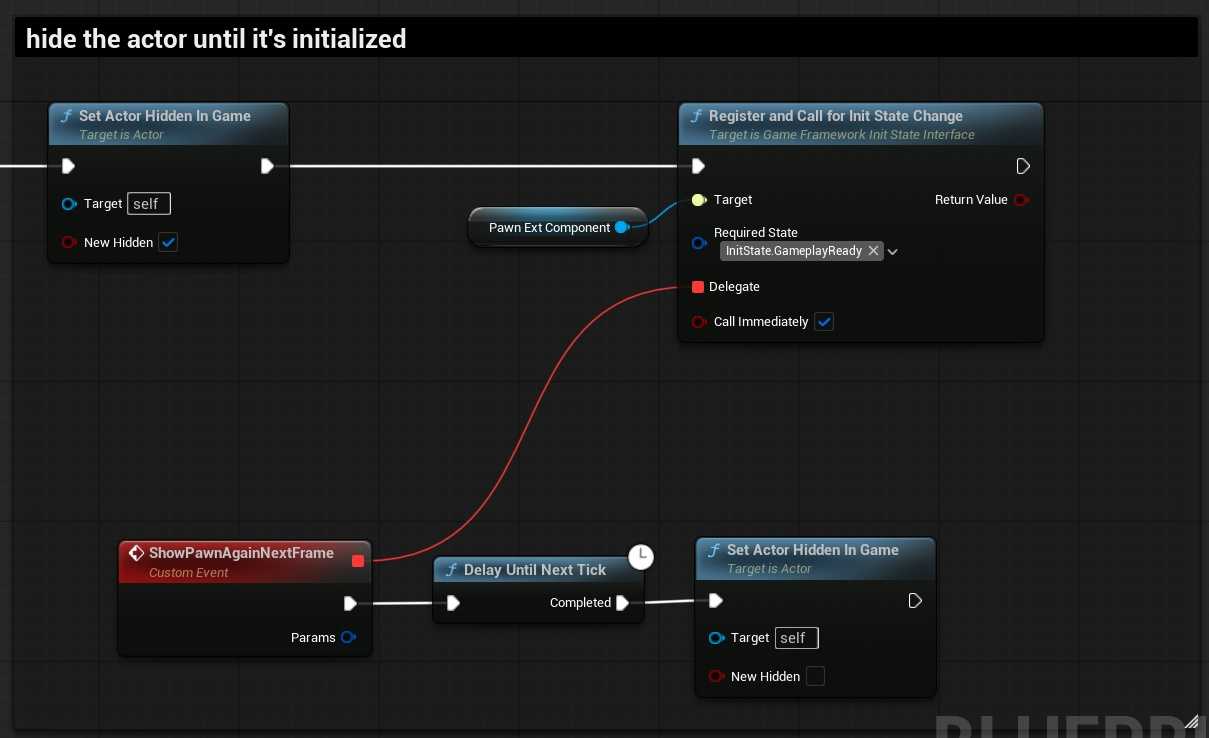
到这里这个状态机的流程应该是比较清楚了。
其他
这个类还剩一些东西,主要是 AbilitySystemComponent 的初始化和注销
ULyraHeroComponent
英雄组件,由于AI控制的也是玩家角色,所以lyra项目的角色都有这个组件。
IGameFrameworkInitStateInterface 的内容和前面 pawn ext comp 是类似的
OnRegister 里面 RegisterInitStateFeature
    static const TArray<FGameplayTag> StateChain = {
        LyraGameplayTags::InitState_Spawned,
        LyraGameplayTags::InitState_DataAvailable,
        LyraGameplayTags::InitState_DataInitialized,
        LyraGameplayTags::InitState_GameplayReady };
InitState_DataAvailable=>InitState_DataInitialized
数据准备好后,
看前面的can里面的逻辑,ALyraPlayerState 和 pawn ext那边的条件,所有组件数据都合法了。
然后他要干嘛呢?
主要是 InitializeAbilitySystem 和 InitializePlayerInput 和 ULyraCameraComponent
void ULyraHeroComponent::HandleChangeInitState(UGameFrameworkComponentManager* Manager, FGameplayTag CurrentState, FGameplayTag DesiredState)
{
    if (CurrentState == LyraGameplayTags::InitState_DataAvailable && DesiredState == LyraGameplayTags::InitState_DataInitialized)
    {
        APawn* Pawn = GetPawn<APawn>();
        ALyraPlayerState* LyraPS = GetPlayerState<ALyraPlayerState>();
        if (!ensure(Pawn && LyraPS))
        {
            return;
        }

        const ULyraPawnData* PawnData = nullptr;

        // 【1】技能
        if (ULyraPawnExtensionComponent* PawnExtComp = ULyraPawnExtensionComponent::FindPawnExtensionComponent(Pawn))
        {
            PawnData = PawnExtComp->GetPawnData<ULyraPawnData>();

            // The player state holds the persistent data for this player (state that persists across deaths and multiple pawns).
            // The ability system component and attribute sets live on the player state.
            PawnExtComp->InitializeAbilitySystem(LyraPS->GetLyraAbilitySystemComponent(), LyraPS);
        }

        // 【2】输入,就是input mapping contex, bind input action 增强输入那些东西
        if (ALyraPlayerController* LyraPC = GetController<ALyraPlayerController>())
        {
            if (Pawn->InputComponent != nullptr)
            {
                InitializePlayerInput(Pawn->InputComponent);
            }
        }

        // Hook up the delegate for all pawns, in case we spectate later
        // 【3】摄像机代理,用于询问当前要用那个摄像机模式
        // 比如如果技能控制了摄像机,就用ASC的,然后是 pawn data 上的默认摄像机模式
        // ShooterCore/Camera/CM_ThirdPersonADS.CM_ThirdPersonADS 找引用
        // 找到 /ShooterCore/Input/Abilities/GA_ADS.GA_ADS
        // 激活技能的时候走 ULyraGameplayAbility::SetCameraMode 来设置这个摄像机模式
        if (PawnData)
        {
            if (ULyraCameraComponent* CameraComponent = ULyraCameraComponent::FindCameraComponent(Pawn))
            {
                CameraComponent->DetermineCameraModeDelegate.BindUObject(this, &ThisClass::DetermineCameraMode);
            }
        }
    }
}
看下剩下的函数
InitializePlayerInput
ULyraHeroComponent::InitializePlayerInput
这个函数太长了
但是本质就是增强输入的 IMC 绑定,和input action 绑定。复杂的内容就是读表。
最后触发事件
    UGameFrameworkComponentManager::SendGameFrameworkComponentExtensionEvent(const_cast<APlayerController*>(PC), NAME_BindInputsNow);
    UGameFrameworkComponentManager::SendGameFrameworkComponentExtensionEvent(const_cast<APawn*>(Pawn), NAME_BindInputsNow);
这个tag在 game feature action 里面有,
具体的看看输入吧
输入 ULyraInputComponent
这个类要去设置 DefaultInputComponentClass 配置一下
从上面的 ULyraHeroComponent::InitializePlayerInput 这里面还有
UEnhancedInputLocalPlayerSubsystem
UEnhancedInputUserSettings
一个一个看
Subsystem 里面有 Settings
if (Mapping.bRegisterWithSettings)
{
    if (UEnhancedInputUserSettings* Settings = Subsystem->GetUserSettings())
    {
        Settings->RegisterInputMappingContext(IMC);
    }

    FModifyContextOptions Options = {};
    Options.bIgnoreAllPressedKeysUntilRelease = false;
    // Actually add the config to the local player
    Subsystem->AddMappingContext(IMC, Mapping.Priority, Options);
}
Subsystem->AddMappingContext(IMC, Mapping.Priority, Options);
我们以前就是这么写的,别多个参数不认识了。
多了一个保存settings的逻辑,引擎类,有个子类 ULyraInputUserSettings 好像定义了没用,按键存档?
ULyraInputComponent* LyraIC = Cast<ULyraInputComponent>(PlayerInputComponent);
if (ensureMsgf(LyraIC, TEXT("Unexpected Input Component class! The Gameplay Abilities will not be bound to their inputs. Change the input component to ULyraInputComponent or a subclass of it.")))
{
    // Add the key mappings that may have been set by the player
    LyraIC->AddInputMappings(InputConfig, Subsystem);

    // This is where we actually bind and input action to a gameplay tag, which means that Gameplay Ability Blueprints will
    // be triggered directly by these input actions Triggered events.
    TArray<uint32> BindHandles;
    LyraIC->BindAbilityActions(InputConfig, this, &ThisClass::Input_AbilityInputTagPressed, &ThisClass::Input_AbilityInputTagReleased, /*out*/ BindHandles);

    LyraIC->BindNativeAction(InputConfig, LyraGameplayTags::InputTag_Move, ETriggerEvent::Triggered, this, &ThisClass::Input_Move, /*bLogIfNotFound=*/ false);
    LyraIC->BindNativeAction(InputConfig, LyraGameplayTags::InputTag_Look_Mouse, ETriggerEvent::Triggered, this, &ThisClass::Input_LookMouse, /*bLogIfNotFound=*/ false);
    LyraIC->BindNativeAction(InputConfig, LyraGameplayTags::InputTag_Look_Stick, ETriggerEvent::Triggered, this, &ThisClass::Input_LookStick, /*bLogIfNotFound=*/ false);
    LyraIC->BindNativeAction(InputConfig, LyraGameplayTags::InputTag_Crouch, ETriggerEvent::Triggered, this, &ThisClass::Input_Crouch, /*bLogIfNotFound=*/ false);
    LyraIC->BindNativeAction(InputConfig, LyraGameplayTags::InputTag_AutoRun, ETriggerEvent::Triggered, this, &ThisClass::Input_AutoRun, /*bLogIfNotFound=*/ false);
}
这一段是hero comp 的注册输入,对输入组件的调用
AddInputMappings 是空的,预留逻辑,【在这里,你可以处理任何自定义逻辑,以便在需要时从你的输入配置中添加内容。】
绑定技能输入,结果从 BindHandles 回给上面的hero comp
template<class UserClass, typename PressedFuncType, typename ReleasedFuncType>
void ULyraInputComponent::BindAbilityActions(const ULyraInputConfig* InputConfig, UserClass* Object, PressedFuncType PressedFunc, ReleasedFuncType ReleasedFunc, TArray<uint32>& BindHandles)
{
    check(InputConfig);

    for (const FLyraInputAction& Action : InputConfig->AbilityInputActions)
    {
        if (Action.InputAction && Action.InputTag.IsValid())
        {
            if (PressedFunc)
            {
                BindHandles.Add(BindAction(Action.InputAction, ETriggerEvent::Triggered, Object, PressedFunc, Action.InputTag).GetHandle());
            }

            if (ReleasedFunc)
            {
                BindHandles.Add(BindAction(Action.InputAction, ETriggerEvent::Completed, Object, ReleasedFunc, Action.InputTag).GetHandle());
            }
        }
    }
}
如果是输入就是这样。
template<class UserClass, typename FuncType>
void ULyraInputComponent::BindNativeAction(const ULyraInputConfig* InputConfig, const FGameplayTag& InputTag, ETriggerEvent TriggerEvent, UserClass* Object, FuncType Func, bool bLogIfNotFound)
{
    check(InputConfig);
    if (const UInputAction* IA = InputConfig->FindNativeInputActionForTag(InputTag, bLogIfNotFound))
    {
        BindAction(IA, TriggerEvent, Object, Func);
    }
}
其实没什么特别的。核心就是BindAction包了一层。技能输入和普通的角色控制输入分开了一下。
这个配置在pawn data里面。比如 native input 就有 move, look, look stick(手柄的) crouch, auto run
技能输入,跳跃,换子弹,治疗,冲刺,开火,自动开火
LyraInputModifiers
这里有一堆modifier
https://www.cwlgame.cn/2024/06/25/ue-%e5%a2%9e%e5%bc%ba%e8%be%93%e5%85%a5%e7%b3%bb%e7%bb%9f/
什么是modifier
/*
* Negate
*/

FInputActionValue UInputModifierNegate::ModifyRaw_Implementation(const UEnhancedPlayerInput* PlayerInput, FInputActionValue CurrentValue, float DeltaTime)
{
    return CurrentValue.Get<FVector>() * FVector(bX ? -1.f : 1.f, bY ? -1.f : 1.f, bZ ? -1.f : 1.f);
}
常见的就是打勾,这个分量就取反
lyra这里三个是 死区,手柄灵敏度,
ULyraInputUserSettings
这个输入绑定哪里有他的父类,都是这里什么都没有,
最父类是USaveGame,就可以看出是存档设置偏好的,例如存下当前灵敏度初始设置多少
ULyraPlayerMappableKeyProfile
这里是 Input Action 里面最下面可以配置
多套预设配置,例如键盘鼠标,手柄布局A, B
这里啥也没写,具体怎么用不知道
ULyraPlayerInput
这是原本 UPlayerInput 的 Lyra 专用替代品,处理底层的输入信号。
在 Lyra 中,它主要扩展了输入延迟检测(Input Latency Tracking)功能。
它重写了 InputKey 函数,可以在按键按下的瞬间捕获时间戳,用于性能分析(配合 FramePro 或 Unreal Insights)。
它被配置在 LyraPlayerController 或项目的输入默认类中,作为默认的 PlayerInput 类。
每当玩家按下键盘、鼠标或手柄按钮时,信号首先经过这里。
主要用于底层输入处理和性能调试,通常不需要修改它来实现游戏逻辑(游戏逻辑应使用 Gameplay Tags 和 Input Actions)。